Ender Gamers Skin Pack
- 26-09-2025, 16:06
- 1 312
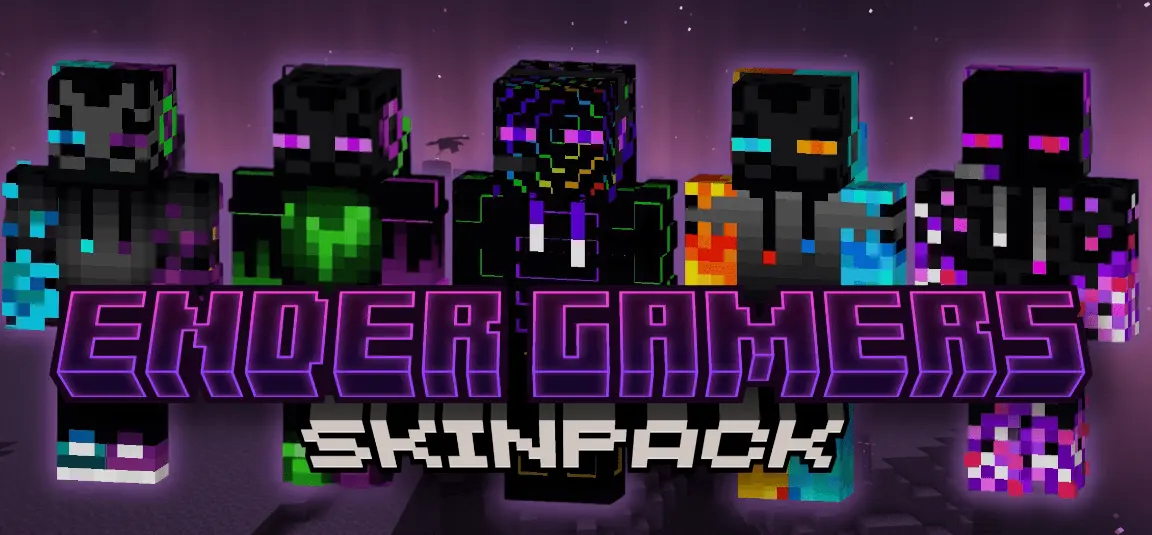
Ender Gamers Skins — an Enderman-themed skin pack for Minecraft Bedrock that leans into black-and-purple energy with just enough glow to read clean in a fight. I ran a few rounds wearing these and the vibe lands instantly: you look like you walked out of an End city, eyes lit, lines sharp, and the silhouette stays readable even with armor on. It’s a tight set of five, all in the same family, so you can swap looks without breaking the theme—one for building nights, one for PvP, one for dragon runs, and you’re covered.
In survival, the colors make sense the second the sun drops. I like scouting with an Ender fit while torching a trail, then popping back into base for crafting without losing that “mystique” feel. When it’s raid time in Minecraft Bedrock, the glow helps teammates find you fast across valleys or in cave choke points. On PvP maps—Bedwars, SkyWars, quick arenas—the black-violet read is clutch for callouts and team identity; we ran a full Ender squad on bridges and it looked sick in screenshots without any shaders. For role-play, it sells portal-plaza patrols and End-style towns perfectly: end rods, chorus trees, and your crew looking like they belong there.
Equipping is quick in the dressing room, so swapping skins between matches takes seconds. The designs hit that sweet spot where they’re flashy enough to feel special but still vanilla-friendly, which keeps your worlds cohesive. If you want a pack that makes every move feel a little more otherworldly while staying practical for real gameplay, Ender Gamers Skins nails it for Minecraft Bedrock—clean lines, eerie glow, and five fits that make the End’s energy your everyday look.
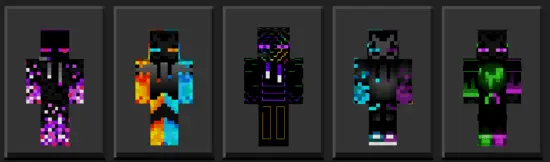
Endermen already have one of the coolest looks in Minecraft. Ender Gamers takes that dark, purple-eyed style and turns it into a collection of skins for players who want to bring a little End energy into every world.
The pack combines the familiar colors of the Enderman with a gamer-inspired look. Black and purple dominate the designs, with bright accents that stand out against the darker outfits. If you like End-themed builds but don’t want to wear a plain mob skin, these give you another way to show it. Pick the design that catches your eye, equip it, and you’re ready to head back into your world.
These skins fit especially well around builds inspired by the End. Picture a base made with dark blocks, purple details, and end rods lighting the entrance. Your character can match the place without looking exactly like an Enderman. They also work nicely against the pale blocks of an End city, where the darker colors give your character a striking look in screenshots. Bring a few friends along, choose different skins from the pack, and take a group shot after your next trip through the portal.
You don’t have to be hunting shulker boxes to wear an Ender skin, though. The collection is just as much at home in a survival base, on a minigame map, or during a round of Bedwars with friends. It’s a fun pick for a group that wants a shared theme while still letting everyone choose their own look. You could even use the skins for an End-themed roleplay world, with each player building a room or tower that matches their character.
One thing to remember: the bright accents are part of the skin’s design. They give it a glowing appearance, but they don’t illuminate caves or give you Enderman abilities. You’ll still need torches in dark places, and you won’t be teleporting away when a creeper sneaks up behind you. Armor can also cover much of your chosen outfit, so take a look at the skin without it when you’re picking your favorite.
To install Ender Gamers, download the .mcpack file and open it with Minecraft Bedrock. Once the pack has been imported, head to the Dressing Room, find the collection, and choose the skin you want to wear. Try a few before settling on one; sometimes an outfit looks different once you see it in your own world. Then grab your gear and get back to building, battling, or exploring. Looking like you belong in the End is a pretty good way to start your next dragon run.
How to Install Skins in Minecraft Bedrock
- Download a .png skin (64×64 or 128×128).
- Open Minecraft Bedrock.
- Go to Profile (hanger icon) → Edit Character.
- Tap Owned → Import → Choose New Skin.
- Select your .png file.
- Pick a model: Classic (Steve) or Slim (Alex).
- Confirm to equip and play.
Comments (0)