Drowned Mobs Skin Pack
- 25-09-2025, 13:49
- 916
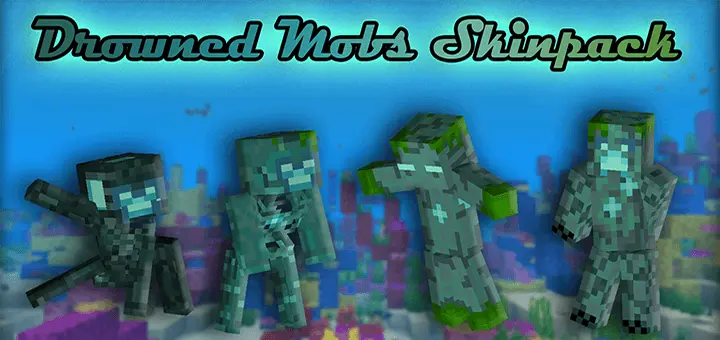
Drowned Mobs Skin Pack — a glow-touched, ocean-core makeover that lets you wear Minecraft Bedrock’s world like the Drowned wear the sea. Every look leans into that signature palette: cold blues, seaweed greens, and those pale, light-blue eyes that read instantly in caves, at night, and under water. It’s a simple idea that lands hard in game: familiar mob silhouettes, re-skinned to feel like they crawled out of a ruined monument and never fully dried off.
Drop these on a realm and the theme writes itself. Build an underwater base, line the halls with sea lanterns, and roll your squad in matching Drowned-style fits so screenshots hit like promo art. On land, the colors still pop; foggy swamps, rainy coastlines, and dark oak forests give you that “storm rolled through� look without needing any extra setup. In PvP and minigames, the palette doubles as team identity—everyone knows who’s on the ocean crew at a glance—while the glowing eyes stay readable through armor and shield spam.
Our Minecraft Realm has a community chest labeled FREE STUFF, which apparently means nobody is allowed to take anything without getting accused of stealing. I learned this while gathering materials for a little experiment involving some Bedrock content we'd recently installed. I grabbed a few stacks of wood, walked over to my project, and immediately got a message asking where all the planks had gone. I reminded everyone what the sign said. That started a ridiculous discussion about whether the chest was supposed to be free or just available for emergencies. Eventually, somebody changed the label to ASK FIRST. We spent more time arguing over wooden planks than actually exploring anything. Still, that's what makes shared Minecraft worlds memorable. There's always some tiny disagreement that turns into a whole story. The chest now has three signs explaining the rules. Nobody reads them, obviously.
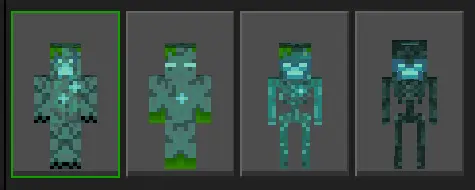
For survival play, the pack just feels right near rivers, beaches, and coral runs. Hunt tridents, raid ruins, or sweep a monument, then come home looking like you belong in the tide. If you’re a builder, it’s perfect for themed towns: docks lit with soul fire, prismarine streets, and residents dressed like they’ve sworn an oath to the deep. Swapping is quick in the dressing room, so you can rotate between your favorite Drowned-style mobs depending on the plan—scout for a shore base, dive a cave system, or host a harbor event at spawn.
If blue and green are your comfort colors and you want skins that actually match the way you play, Drowned Mobs Skin Pack nails the vibe: cool tones, clean glow, and a magic-aquatic style that feels made for Minecraft Bedrock.
How to Install Skins in Minecraft Bedrock
- Download a .png skin (64×64 or 128×128).
- Open Minecraft Bedrock.
- Go to Profile (hanger icon) → Edit Character.
- Tap Owned → Import → Choose New Skin.
- Select your .png file.
- Pick a model: Classic (Steve) or Slim (Alex).
- Confirm to equip and play.
Comments (0)