Zombie Skin Pack
- 20-09-2025, 15:28
- 2 107
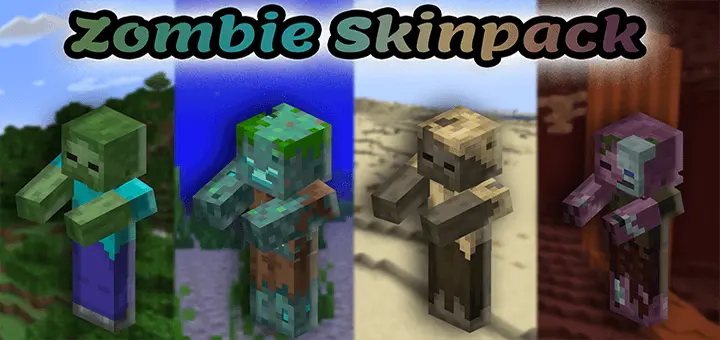
Zombie Skin Pack is your all-in, no-fluff way to go full undead in Minecraft Bedrock. It’s a straight shot of fan service: skins pulled from the actual mob textures, plus new variants to keep lobbies from looking like clones. You get the usual suspects—classic Zombie, Drowned, Husk, Zombie Villager—and a handful of original takes, capped off with Herobrine zombie flavors for that “did you just see that?” vibe. The extra touch is the built-in zombie arm animations (idle and attack), so your swings look the part instead of just being “guy in green clothes.”
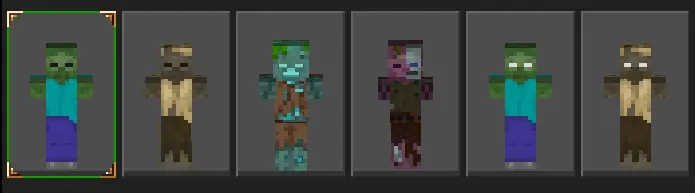
I ran this on a Halloween survival night and it sold the theme instantly. In towns, everyone picked a different variant so callouts made sense: “Husk on farms,” “Villager in library,” “Drowned at docks.” For minigames, it’s perfect for Infected or Murder Mystery—undead skins on one team, survivors on the other, clean reads even in low light. Screenshots slap, too; because the pack sticks to vanilla art, it plays nice with most shader/texture combos without the plastic look. I spent twenty minutes watching a sniffer wander around my Minecraft garden while I was supposed to be checking out a new Bedrock addon. The poor thing wasn't doing anything particularly exciting. I just liked watching it sniff the ground while I figured out what I wanted to try next. Eventually, I remembered why I'd opened the game and went back to experimenting. That's one of the things I enjoy about Minecraft. New content doesn't have to demand your attention every second. You can mess around with something interesting, go back to your normal activities, and return whenever another idea pops into your head. I actually prefer that to feeling like I've got a huge list of objectives to complete. My garden still needs work, though. The sniffer has plenty of space to wander around, but I somehow forgot to finish the fence. At least he seems happy with the arrangement.
A few tips from testing: if you’re doing roleplay, assign variants by biome (Drowned for harbor guards, Husks for desert raiders) and your server gets instant world-building. For PvP nights, use the Herobrine zombie skins as “boss” roles—easy to spot, fun to chase. And if you stream, these read well at a glance; silhouettes match the mobs you already know, so viewers catch the joke immediately.
If you want a zombie look that feels true to vanilla, scales to events, and doesn’t fight your pack stack, Zombie Skin Pack is a plug-and-play win for Bedrock.
How to Install Skins in Minecraft Bedrock
- Download a .png skin (64×64 or 128×128).
- Open Minecraft Bedrock.
- Go to Profile (hanger icon) → Edit Character.
- Tap Owned → Import → Choose New Skin.
- Select your .png file.
- Pick a model: Classic (Steve) or Slim (Alex).
- Confirm to equip and play.
Comments (0)