High School Seifuku Skin Pack
- 25-09-2025, 13:37
- 901

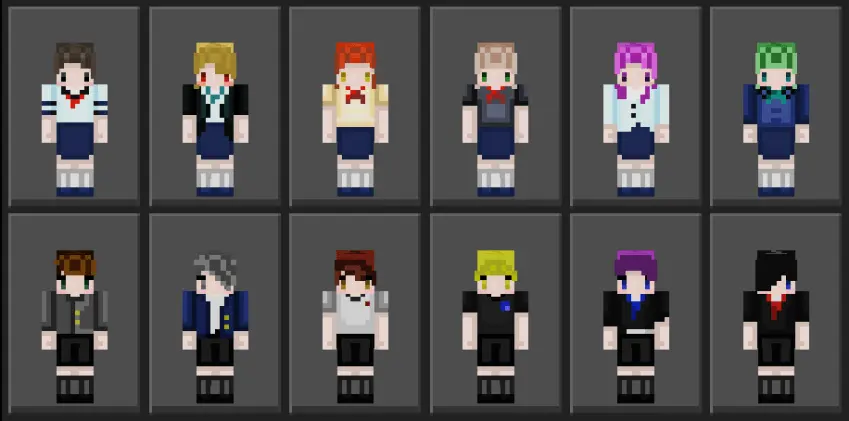
High School Seifuku Skin Pack — a clean, instantly readable set of uniforms that makes your Minecraft Bedrock world feel like the first day of school. Toss one on and the tone shifts right away: hallways feel busier, classrooms make sense, and your squad suddenly looks like they actually belong on the same campus.
This pack shines in role-play. Post up in a homeroom you built over the weekend, ring the bell, and split the crew between classes, club rooms, and the rooftop “don’t be late� meetup. Walk the courtyard with friends, hit the cafeteria for a quick break, then sprint to gym for scrims on the field before sunset. Because everyone’s in matching seifuku style, callouts are instant and screenshots look intentional—perfect for thumbnails, server promos, or just flexing your new campus build.
The moment something becomes part of my normal Minecraft routine, I stop thinking about how new it is. I'll be repairing tools, feeding animals, or heading back from a mining trip, and whatever Bedrock content I've installed is simply there alongside everything else. I actually enjoy reaching that point. The first evening is usually full of curiosity, but later sessions are where I figure out whether something suits me. Sometimes I keep coming back to an addition because I genuinely like having it around. Sometimes I enjoy it for a couple of evenings and then move on. I don't see any reason to force myself to keep using something just because I spent time downloading it. Minecraft is supposed to be fun, not another collection of chores. I've already got enough responsibilities in my survival world. The villagers expect trades, the farm needs harvesting, and there's a suspicious hole in my roof that nobody has bothered fixing.
It’s great for minigames too. Queue Bedwars or SkyWars and roll in as one class; the uniform read keeps team identity crystal clear even when fights get messy. On survival realms, the look sells the story without extra effort: morning commute from a suburban starter house, lockers by the corridor, study sessions in the library you tucked above spawn. When the day’s over, trade uniforms for work gear, then switch back for a festival night with lanterns and booth stands lining the main street.
Equipping is quick in the Bedrock dressing room, so swapping characters for scenes or events takes seconds. No extra setup, no fuss—just a solid aesthetic that fits any modern town or school map. If you want that warm “school year� energy in your world, the High School Seifuku Skin Pack lands exactly right for Minecraft Bedrock: clean look, easy team identity, and endless ways to spin everyday campus stories into big memories.
How to Install Skins in Minecraft Bedrock
- Download a .png skin (64×64 or 128×128).
- Open Minecraft Bedrock.
- Go to Profile (hanger icon) → Edit Character.
- Tap Owned → Import → Choose New Skin.
- Select your .png file.
- Pick a model: Classic (Steve) or Slim (Alex).
- Confirm to equip and play.
Comments (0)