Smiles Skins
- 20-09-2025, 14:47
- 1 293
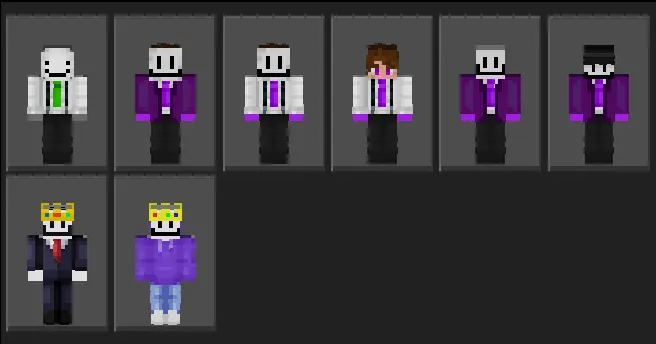
Smiles Skins is a creator-made Minecraft Bedrock skin pack built by your friend and wrapped up so it’s easy to download and equip—yes, even if you’re playing on Xbox. The vibe is simple and fun: bright palettes, crisp shading, and those goofy, confident grin faces that read instantly in screenshots and lobbies. You pick a smile, hop into the Dressing Room, and you’re ready for survival nights, PvP queues, or city-roleplay without blending into the crowd.
What sells it in-game is readability. The colors pop without looking plastic, so teammates can spot you mid-fight or across a build site. Thumbnails and short clips also land cleaner, since the silhouettes are bold and the expressions don’t get lost once you add shaders or texture packs. We ran a quick Bedwars session with everyone in a different smile variant and callouts were automatic—“blue smile on diamond gen� is way faster than describing random outfits. I was collecting clay beside a river when I realized I'd spent almost an entire week playing Minecraft without visiting my main base. I'd been staying in a little temporary camp while exploring some Bedrock content, and apparently I'd gotten comfortable enough to forget about everything waiting at home. There was a crafting table, a couple of furnaces, some storage, and a bed tucked inside a wooden shelter. Nothing impressive, but I had everything I needed for the moment. I kept finding little reasons to stay another evening, whether that meant exploring the surrounding terrain or trying something I'd been curious about. Eventually, I returned home with a full inventory and several new ideas. My big survival house suddenly felt strangely unfamiliar after spending so much time in that tiny camp. I went back to the river the following weekend. Apparently, I've accidentally acquired a second home.
Because it’s a proper skin pack (not a one-off PNG), it plays nice across Bedrock devices—Xbox, Windows, iOS, Android—so your friend on console can equip it the same way you do. Grab the pack, import, and it shows up with the rest of your skins; no weird commands, no behavior packs, just pick a look and queue. If you’re hosting events, you can even color-code teams by smile tone and keep matches readable for streams and spectators.
Bottom line: this is your friend’s work, polished and bundled for easy use. If you want a clean, upbeat Bedrock skin pack that stands out in PvP, looks great in roleplay, and just makes your squad feel coordinated, Smiles Skins hits the mark.
How to Install Skins in Minecraft Bedrock
- Download a .png skin (64×64 or 128×128).
- Open Minecraft Bedrock.
- Go to Profile (hanger icon) → Edit Character.
- Tap Owned → Import → Choose New Skin.
- Select your .png file.
- Pick a model: Classic (Steve) or Slim (Alex).
- Confirm to equip and play.
Comments (0)