Hooters Skin Pack
- 12-09-2025, 16:36
- 1 297
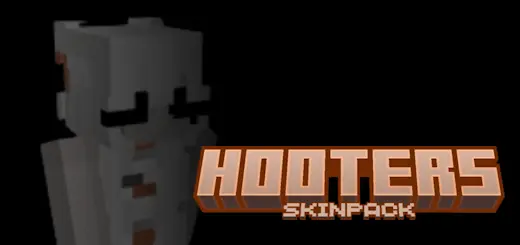
Hooters Skin Pack
Quick hook: want your squad to look like a real crew the second you load in? These skins snap into that bright orange-and-white vibe and read instantly in third person and thumbnails. You’ll pop in screenshots, but you won’t lose readability in fights or parkour—solid outlines, clean shading, and first-person sleeves that don’t get muddy.
Here’s the feel in Minecraft Bedrock after a few sessions: the Hooters Skin Pack turns casual play into an event. On a modern city map, I’ll drop a roadside diner build, hang a few orange banners, and the skins do the rest—boom, the block feels alive. In Survival, the palette pairs nicely with birch, smooth quartz, copper, and acacia, so your character never clashes with base aesthetics. Armor sits on top without ruining the look—iron and diamond leave enough of the color scheme peeking through, and dyed leather can match for themed RP nights. Elytra screenshots land, too; those bright accents carry in the air.

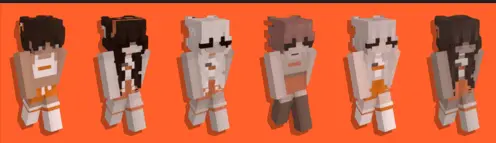
Your Minecraft city has roads, shops, and a row of houses. Now it needs somewhere to grab a bite—and the Hooters Skin Pack gives your restaurant crew an outfit for the job.
Inspired by the restaurant’s recognizable orange-and-white style, this collection brings a playful uniform look to Minecraft Bedrock. The bright colors stand out against the usual stone, wood, and brick of a city build, making the skins easy to spot when your friends arrive. Choose a look from the pack and you’re ready to step behind the counter, greet customers, or simply hang out in a skin that suits your restaurant-themed world.
If you enjoy building in Creative, the pack gives you a good excuse to add a diner or sports bar to your town. Start with a counter and a few tables, then make a kitchen with furnaces and smokers. Orange and white banners can carry the color scheme through the building, while item frames make handy menu boards. Put your chosen skin on before opening the doors, and the restaurant starts to feel like a place someone actually runs.
The best part comes when friends join in. One player can take orders, another can handle the kitchen, and everyone else can pile in as customers. Put together a simple menu using cooked chicken, bread, potatoes, and whatever else you have in your Minecraft pantry. You could even make a game of delivering orders to houses around your town. There’s plenty of room for someone to forget the potatoes and blame the kitchen when the chat starts complaining.
You don’t need a finished restaurant to wear one of these skins, either. The orange-and-white look works for exploring a city map, playing minigames, or adding a bit of personality to an ordinary survival session. If your friends like matching outfits, choose skins from the collection for a group photo in front of your latest build. Remember that armor can cover parts of your outfit, so take it off somewhere safe if you want the full look in your screenshot.
To use the Hooters Skin Pack, download the .mcpack file and open it with Minecraft Bedrock. Once the import is complete, head to the Dressing Room and find the pack among your available skins. Pick the outfit you like and equip it before entering your world. The skins change your character’s appearance; the restaurant, menu, and roleplay are yours to create. Grab some building blocks, invite the crew, and see who gets stuck taking the first order.
On Realms, it’s perfect for teams and jobs: host shifts at a food court, run delivery races across districts, or theme a mini-game hub so players can spot staff at a glance. For creators, the skins are thumbnail gold—bold colors, readable silhouettes, and hands that look tidy in building POVs. Everything stays purely cosmetic, achievement-friendly, and performance-light; you’re not changing hitboxes or sneaking in scripts, just swapping your fit.
Tips to sell the theme: use orange/white banners at entrances, place barrels and smokers behind a counter for kitchen vibes, and set up bell “order” callouts. If you’re chasing a playful, high-energy look that says “this spot is open for business,” the Hooters Skin Pack nails it—and your world instantly feels a little more like a bustling server hotspot.
How to Install Skins in Minecraft Bedrock
- Download a .png skin (64×64 or 128×128).
- Open Minecraft Bedrock.
- Go to Profile (hanger icon) → Edit Character.
- Tap Owned → Import → Choose New Skin.
- Select your .png file.
- Pick a model: Classic (Steve) or Slim (Alex).
- Confirm to equip and play.
Comments (0)