Project Sekai Collection Skin Pack
- 7-09-2025, 08:40
- 1 810
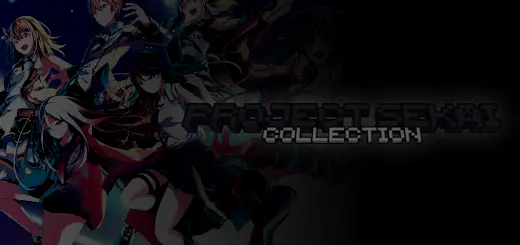
Project Sekai Collection Skin Pack — stage-ready style for Minecraft Bedrock
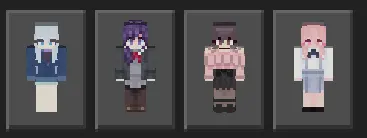
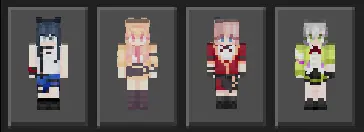
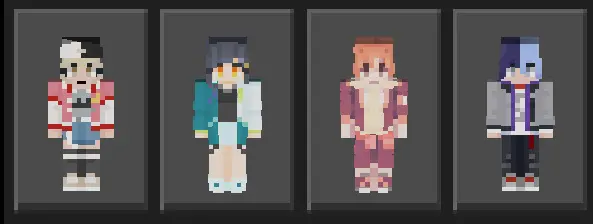
If your server nights feel a little too quiet, this skinpack turns spawn into a backstage door. Slip into the Project Sekai Collection Skin Pack and roll out as Leo/need, MORE MORE JUMP!, Vivid BAD SQUAD, Wonderlands x Show Time, Nightcord at 25:00, or one of the iconic virtual singers. The vibe shift is instant—city plazas become pop-up stages, parkour maps look like rehearsal runs, and screenshots hit that “tour poster” energy.
What I like here is how clean the silhouettes read in-game. Bright unit colors pop in lobbies, darker fits hold up under torchlight, and the faces still look good in third-person thumbnails. On Minecraft Bedrock realms, you can theme whole nights around units: VBS for street races, WxS for minigame chaos, Leo/need for cozy build sessions, Nightcord for moody cave dives, and MMJ whenever you want the plaza to feel like a festival.
Easy wins:
Build a quick stage with note blocks and sea lanterns, then rotate “sets” across maps between rounds.
Match skins with dyed leather or armor trims—amethyst and gold look ridiculously good for chorus shots.
For clips, run F1 mode at sunset, fire a few fireworks, and let the color blocking do the work.
No mechanics change, achievements stay on—it’s pure style that travels with you. If you want a simple way to make your world louder, brighter, and way more screenshot-friendly, the Project Sekai Collection Skin Pack brings rhythm-game attitude straight into your Bedrock adventures.
Forget the perfect combo for a minute—your next Project SEKAI challenge is surviving a creeper attack without ruining the group photo. This skin collection brings the game’s musical units into Minecraft Bedrock, so your favorite crew can join the chaos.
Start with the group you know best. The collection has separate packs for Leo/need, MORE MORE JUMP!, Vivid BAD SQUAD, Wonderlands x Show Time, and Nightcord at 25:00, plus a Virtual Singer pack. If your friends have been arguing over which unit has the best songs, now you can continue that debate while building a base together. Pick a skin from your favorite group, meet at spawn, and see who shows up repping the same side. The Minecraft designs bring the characters into the game’s blocky style, making them a fun choice for players who want something more personal than their usual survival outfit. You can choose one look for a long-running world or keep several packs available for the next time your favorite unit changes—which, depending on how your latest Project SEKAI session went, could be tomorrow.
There’s plenty you can do with a group once everyone has picked a character. Turn a city square into a concert venue, with a stage, backstage rooms, and seats for the audience. Use note blocks for a little music, add fireworks for the finale, and let each player take a turn in the spotlight. If that sounds like too much construction for one evening, a simple platform and a good view work just fine. You could also split into teams by unit for a parkour race, a build contest, or a round of hide-and-seek. Watching a supposedly coordinated performance fall apart because someone missed a jump is a pretty good Minecraft event in its own right. For screenshots, try gathering at sunset or lining up outside your finished venue before the fireworks start. Just remember to take off your helmets if you want the character designs visible in the picture.
The skins are cosmetic, so they won’t add Project SEKAI tracks, dance animations, or special abilities to your world. Your character can still mine, fight, and build as usual; the difference is that you get to do it dressed as someone from the game. The group packs come as separate .mcpack files, so download the ones you want, open each file with Minecraft, and look for the imported collection in the Dressing Room. That setup is handy if you only want one unit, but there’s room to collect the others when you’re ready for a different look. Wear a favorite character while exploring with friends, bring a whole group together for a server event, or simply swap out your usual skin before the next mining trip. Even if the evening ends with everyone arguing over who forgot the torches, at least the lineup will look great.
How to Install Skins in Minecraft Bedrock
- Download a .png skin (64×64 or 128×128).
- Open Minecraft Bedrock.
- Go to Profile (hanger icon) → Edit Character.
- Tap Owned → Import → Choose New Skin.
- Select your .png file.
- Pick a model: Classic (Steve) or Slim (Alex).
- Confirm to equip and play.
Comments (0)