Creeper Girl Skin Pack
- 12-09-2025, 22:01
- 1 429
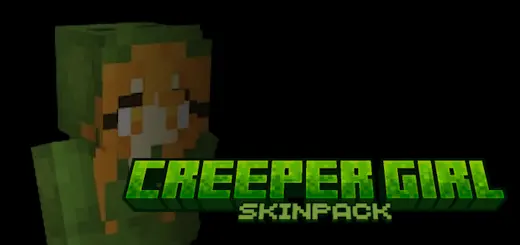
Boom, but make it fashion. The Creeper Girl Skin Pack takes that iconic green palette and turns it into a full wardrobe—sleek hoodies, streetwear cuts, and hair colors that sit right on Minecraft Bedrock’s blocky canvas. You load in and the vibe is instant: classic creeper pixels woven into jackets and trim, neon accents where it counts, and silhouettes that still read clearly in third-person and first-person hands.
I’ve been running these on SMP and they just work everywhere. In survival, the greens pair perfectly with bamboo, copper, and moss builds—your character becomes part of the scene instead of clashing with it. Drop into a market plaza, hit F5, and it’s instant thumbnail material; shader sunsets bounce off the pastel highlights without blowing out the look. Armor doesn’t ruin the fit either—iron and diamond frames leave just enough creeper pattern peeking through that you still feel on-brand mid-raid. For roleplay nights, it’s easy to theme: hang a creeper banner by your stall, dye beds and candles to match, and your setup reads “curated” without a texture pack.
Movement reads clean in parkour and PvP, too. The designs keep strong outlines so teammates spot you in a crowd, and the color pops against stone, wood, and nether blocks for crisp callouts. It’s strictly cosmetic—no hitbox weirdness, no performance tax—so achievements and gameplay stay stock. If you love classic Minecraft flavor but want a little modern drip, Creeper Girl Skin Pack nails that sweet, playful tone and makes every screenshot look like you planned it.

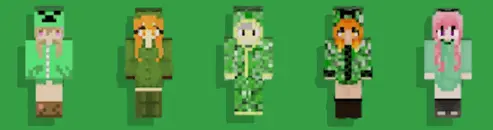
Creepers have ruined plenty of perfect builds, but you have to admit: green pixels never go out of style. Creeper Girl turns that familiar look into a collection of skins for Minecraft Bedrock, mixing mob-inspired colors with modern outfits.
The designs take the Creeper’s green palette and work it into girl skins with different clothing and hairstyles. You’ll find familiar pixel patterns alongside hoodie and streetwear looks, so you can pick an outfit that feels like your own while keeping the Minecraft theme. Some details are brighter than others, giving you a choice between a look that stands out and one that feels a little more understated. Take a look through the collection and see which one you’d actually want to wear for a long survival session.
A Creeper-inspired outfit is an easy match for all kinds of builds. If your base is tucked into a jungle or surrounded by a mossy garden, the green colors fit right in. Building a modern house instead? A hoodie-style skin looks just as comfortable hanging out near your storage room as it does on a castle wall. Switch to third-person for a moment and see how the outfit looks against the places you’ve spent time creating.
The pack is fun to share with friends, too. Everyone can choose a different Creeper Girl look for a group screenshot, a themed building session, or a round of minigames. Pick a spot in your world, grab some green blocks and decorations, and put together a Creeper-themed hangout. Or skip the planning entirely: show up at your friend’s base in a matching outfit and see how long it takes them to notice.
These are player skins, so they change how your character looks without changing how you play. You won’t explode, sneak past hostile Creepers, or get special abilities from wearing one. You’ll still want to listen for that familiar hiss when you’re mining or working outside at night. Armor can cover much of an outfit, too, so find a safe place to take it off if you want a good look at the design or a screenshot of the full skin.
Creeper Girl comes as a skin pack for Minecraft Bedrock. Download the .mcpack file and open it with Minecraft to import it, then head to the Dressing Room and look for the collection among your available skins. Try a few outfits before choosing one; the little differences in color, clothing, and hair can change the whole look. Once you’ve found a favorite, equip it and get back to your world. Just keep those actual Creepers away from your front door.
How to Install Skins in Minecraft Bedrock
- Download a .png skin (64×64 or 128×128).
- Open Minecraft Bedrock.
- Go to Profile (hanger icon) → Edit Character.
- Tap Owned → Import → Choose New Skin.
- Select your .png file.
- Pick a model: Classic (Steve) or Slim (Alex).
- Confirm to equip and play.
Comments (0)