DAMAGE INDICATOR HUD Mod / Addon
- 12-05-2026, 02:02
- 1 732
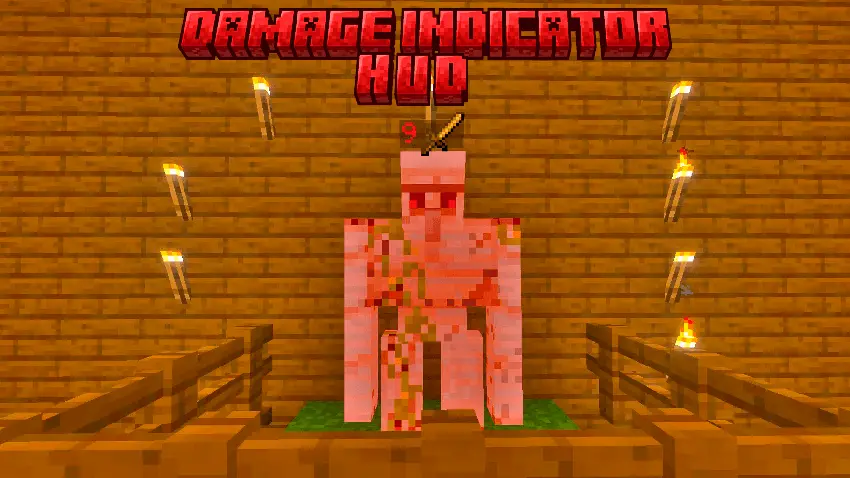
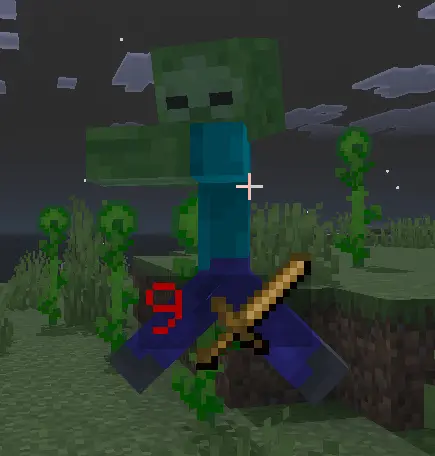
Alright, so I tried the Damage Indicator HUD mod in my Bedrock world, and now I can’t go back. Every time you hit a mob, a big red number pops right above it, showing exactly how much damage you did. No guessing, no “was that a crit?� — you see it, plain and clear.
Swinging your sword into an iron golem without any clue how much health it actually has left feels like fighting with a blindfold on. Damage Indicator HUD Mod Addon solves that exact frustration by placing clean, readable combat numbers right in front of your eyes across every single fight in Bedrock.
Vanilla combat in this game has always suffered from zero feedback. You land three critical hits with a sharp diamond blade, the zombie flashes red, and you still have no idea if that monster has one heart remaining or five. That lack of transparency turns intense dungeon runs into a blind guessing game, especially when you encounter raid captains or mutated modded bosses with beefed-up defense stats. You constantly waste weapon durability landing overkill shots on creatures that were already sitting on half a heart, or worse, you push aggressively thinking a hostile mob is on the verge of collapsing only to eat a fatal counterattack.
This interface upgrade changes your entire approach to spacing and tempo. The moment your weapon connects with a hitbox, dynamic floating numbers pop up to show the exact numeric punishment you dished out. Critical strikes, sweeping hits, and projectile pokes instantly register on screen, letting you measure your true damage per second against armored targets. It even tracks incoming hits on your own character, meaning you finally see how much protection your enchanted chestplate absorbs when a creeper sneaks into your flank. Having those figures float above targets gives every melee trade an authentic action RPG feel without cluttering the native user interface.
Multiplayer realms gain an immediate tactical upgrade once players start running these combat popups. In cooperative trial chambers, callouts become razor sharp instead of vague panic screams. Your tank can call out when a brute hits critical health, allowing backline archers to execute the target while everyone else focuses down new spawns. For arena duelists, keeping tabs on enemy defense changes the entire meta. You can see through your opponent shield baits, recognize when their golden apple effects drop off, and commit to aggressive rushdowns the second their health pool dips into the danger zone.
The visual layout stays lightweight so your screen never feels like a chaotic spreadsheet during massive village raids. The floating digits fade quickly into the background, avoiding awkward frame drops or visual obstruction when six skeletons start firing arrows simultaneously. Handheld touch devices, home consoles, and PCs handle the custom scripts without hitching or input lag, making it a reliable addition to any survival seed.
Setup takes barely two minutes in your world preferences. Move the downloaded package straight into your system folders, activate the pack under your active behavior and resource directories, and ensure experimental creator options are switched on before loading the map. Once you step into your world and see your real numbers ticking above every fight, heading back to silent vanilla combat is completely out of the question.
It’s super satisfying too. You land a clean hit, the number flashes up, and you get that little sword icon next to it like you just landed a perfect blow. Fighting mobs suddenly feels way more intense, because you’re actually watching their health melt hit by hit.
I tested it on everything — cows, zombies, skeletons, even some crazy boss from another addon — and it works on all of them. In PvP, it’s a total cheat code for figuring out which weapon setup hits hardest. Once you run with Damage Indicator HUD, turning it off feels like fighting blindfolded.
Installation:
- Download Mod;
- Use Minecraft
- Open the downloaded file to install;
- Select it in the settings;
- Have fun!
Comments (0)