Night Walkers Skin Pack
- 13-08-2026, 10:08
- 387

The Night Walkers Skin Pack unleashes six terrifying horror models to instantly turn your Minecraft world into a total nightmare. If you want to stalk your friends in the dark with something genuinely creepy, this bundle is exactly what you need.
Let's talk about setting the mood. Usually, when players try to build scary servers, they rely on those same boring zombie textures we have all seen for a decade. This drop completely changes the game by giving you six distinct, creepy figures that look like they crawled right out of a digital urban legend. There is something incredibly unsettling about a twisted monster wearing formal clothes while sprinting at you through a dark spruce forest.
Whether you are setting up a massive Halloween event on your realm or just messing around in a custom thriller map, having the right avatar makes all the difference. The textures on these models are hyper-detailed, avoiding that muddy, low-res look a lot of dark designs suffer from. The shading works perfectly when you hide out in unlit cave systems, making you practically invisible until you jump out to ruin someone's day.
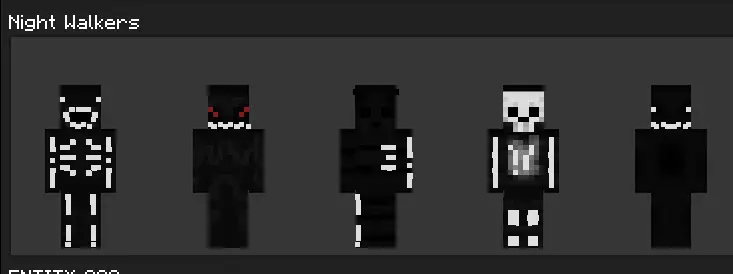
Scouting the internet for a solid Minecraft Bedrock skin pack that actually delivers on the scares can be super annoying. Fortunately, this collection of six MCPE horror skins skips the fluff and hands you pure nightmare fuel. Stop relying on those basic default looks. Download these custom Minecraft skins today and go completely terrify your server.
Quick guide: How to install this Minecraft skinpack
Downloaded the .mcpack file? Here is exactly how to get it into your game depending on what device you are using right now.
- On Windows or Android: Just click or tap the downloaded file twice. Minecraft will open up on its own and load the skins immediately.
- On iPhone or iPad: Save the file, open your Files app, and hold your finger on it. Hit Share, select Minecraft from the list, and the game will handle the rest.
To put the skins on, just open Minecraft, head over to the Dressing Room (Profile), click on Classic Skins on the left, find this pack under Owned, and tap Equip.
Comments (0)