The Lost Blocks Mod / Addon
- 12-09-2025, 15:21
- 1 183
Make your world look lived-in, not just placed. The Lost Blocks mod is a tiny change with a huge payoff for builders in Minecraft Bedrock: you can turn more of your favorite building blocks into mossy or cracked versions at a crafting table, then blend them into walls, streets, towers, and dungeons for instant story and depth.
Here’s the hook: you decide how old a build feels. Want a fortress that’s seen a hundred storms? Pepper in cracked pieces along stress points—arch keystones, stair treads, bridge centers—then sweep mossy variants along the shaded sides and waterlines. For villages, swap a few path blocks to cracked to sell cart ruts and foot traffic, or run a soft moss gradient up north-facing walls to hint at damp climate. Ruins practically build themselves: collapse a corner, stack cracked edges where the fall started, and trace a mossy creep through the rubble toward a well or stream.
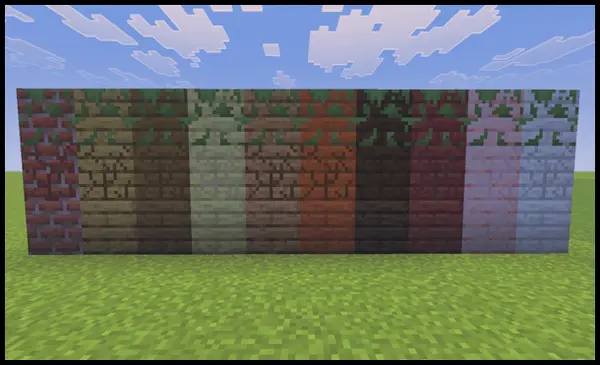
A fortress can have towering walls and a perfect gate, but if every block looks freshly placed, it may still feel brand-new. The Lost Blocks gives Minecraft Bedrock builders more mossy and cracked block variants to make those walls look like they’ve been standing for years.
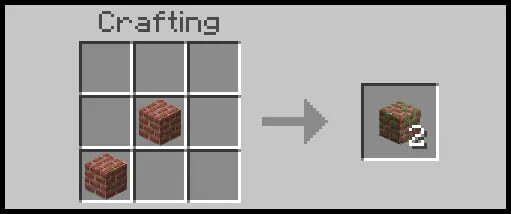
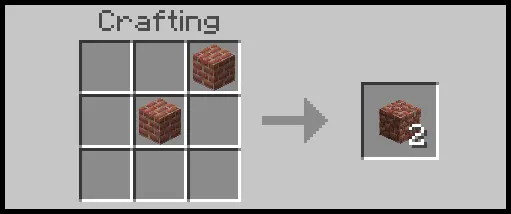
The idea is simple: take suitable building materials to a crafting table and turn them into weathered alternatives. You can then mix the new blocks into your existing builds or start a project with an aged palette from the beginning. The crafting-table approach makes the addon useful in survival, where you’re already gathering materials and making trips back to your base. Check the recipes available in-game to see which blocks you can convert, then make a small batch before committing your entire storage chest to a makeover. The addon is also described as keeping achievements enabled, so you can keep working toward those goals while decorating your world. There’s no need to wait until you’re constructing a massive castle, either. A little moss around the entrance to a mine or a few cracked blocks in an old garden wall can give an everyday build some character.
The best results often come from thinking about how a place is used. A bridge might have worn-looking blocks along its busiest stretch, while the sides nearest the water could use a touch of moss. An abandoned tower gives you an excuse to go further: break up the outline, add cracked sections around a damaged doorway, and let moss spread toward the base. You don’t have to scatter every variant evenly across the build. Keeping some areas cleaner makes the rougher sections stand out and gives your eyes somewhere to rest. For a village path, try mixing a few weathered blocks into the edges and around corners where the road meets older buildings. Then step back and take a look from a distance. If the whole street starts looking like it survived three explosions and a creeper convention, swap a few blocks back.
The Lost Blocks is especially handy for adventure maps, medieval towns, dungeons, and survival worlds that have grown over time. A mine entrance can look well-used, a castle courtyard can feel neglected, and a waterside wall can pick up some green without rebuilding the whole structure. You can even revisit an old starter base and give it a second life as the place where your world began. The new variants are there to support whatever story you want the build to tell: a cared-for town might need only a few subtle details, while a forgotten ruin can be as rough as you like. Import the addon, activate it in your world settings, and try the available recipes on a small section first. Once you’ve found a combination you like, carry it through paths, walls, and nearby structures to make the area feel connected.
Because it’s all crafting-table driven, the loop fits survival: harvest, convert, place, repeat. No weird machines, no commands, no data-pack gymnastics. And the best part—this add-on does not disable achievements, so you can keep unlocking while you texture like a pro. It’s pure vanilla-friendly workflow with a bigger palette.
Practical tips from my runs: keep your “weathering ratio� modest (10–30%) to avoid noise; concentrate cracks where weight or traffic would actually be; drag moss around water, soil, and shaded blocks instead of random scatter. For adventure maps and SMP hubs, this is an instant upgrade—cathedrals look ancient, mines look worked, and even a humble starter base reads like it has history. If you’re serious about detail without bloat, The Lost Blocks mod gives Minecraft Bedrock exactly the textures it’s been missing.
Installation:
- Download Mod;
- Use Minecraft
- Open the downloaded file to install;
- Select it in the settings;
- Have fun!
Comments (0)