Modular Fences Mod / Addon
- 11-09-2025, 17:52
- 1 140

Teams+ mod
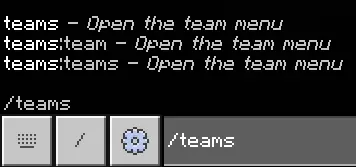
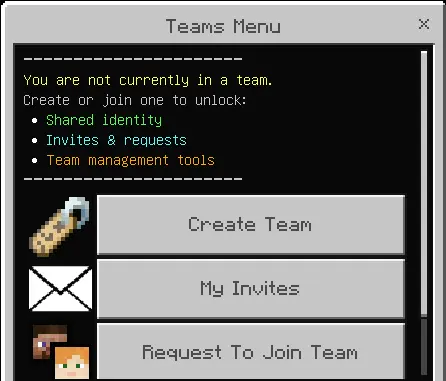
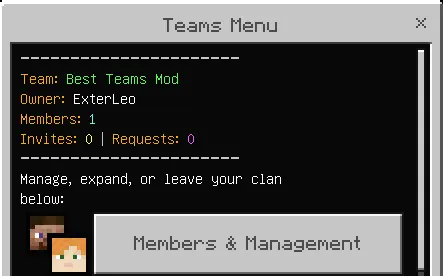
Grab the squad and make it official. Teams+ turns loose friend groups into real teams in Minecraft Bedrock, so you can build, raid, and run events without the usual “who hit me?” drama. You open a slick menu, create a team with a name that actually fits your crew, and you’re the owner from second one. From there it’s pure management: send invites, accept requests, prune the roster, and keep things tidy before a big session. No command spam, no external docs—everything lives in modals and buttons you can click while you’re moving.
The best part shows up the moment you swing a sword near a teammate: friendly fire is off. You can stack up on a boss or clear mobs in a tight hallway without griefing your own line. Dynamic nametags do the rest, formatting names so you instantly know who’s with who across a messy battlefield or a crowded spawn. It reads clean in screenshots and it saves arguments when the server fills up.
A white picket fence looks right outside a suburban house, but it might feel a little out of place around a medieval castle. Modular Fences gives Minecraft Bedrock builders more ways to frame their builds, with connectable designs made from wood, glass, and metal.
The detailed wooden fences are a great place to start if you like rustic villages or medieval builds. Their cut-log details and more intricate construction give paths, bridges, and courtyards a different look from a standard fence line. There are variations for different wood types, so you can choose one that matches your building materials. Try a darker fence around a spruce cabin or a lighter one beside a garden path and see how it changes the whole area.
For modern builds, the glass panel fence offers a cleaner look. It comes with black or silver-colored joints and works well along a balcony or terrace where you don’t want to hide the view. The collection also includes a tall outdoor fence for a more private-looking boundary and a simple metal design that could fit around a city property. If you’re building a neighborhood, the white picket fence is an easy choice for front yards and little gardens.
The useful part is that the addon’s fence designs connect to one another. You can mix styles as a path moves from one part of your build to another: a wooden section might lead toward a cottage, while glass panels continue around a modern patio. Experiment with a few combinations before committing to a long perimeter. A small test beside your build can help you decide which colors and materials work together.
You can find the fences in the Creative inventory, and the addon also provides crafting recipes for use in Survival. That means you can add them while building a world from scratch or work them into a base you’ve already spent time on. They’re particularly handy for those finishing touches that are easy to put off: the edge of a courtyard, a walkway above a garden, or the boundary between two neighboring houses.
Before relying on a design to contain animals, test it in your world. One review reports that sheep can jump over the addon’s fences, so they may be better suited to decoration than livestock pens. Once you’ve imported the addon, enable its behavior and resource packs in your world settings, then try a few sections around your favorite build. A different fence is a small change, but it can make a finished house feel like it finally belongs in its surroundings.
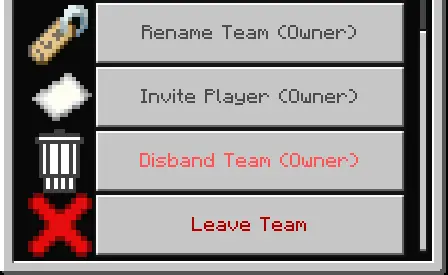
Ownership actually means control. You can rename the team to match a new season theme, pass the crown if you’re logging off for a while, boot inactive players to make room, or end the team when it’s time to shuffle rosters. It’s perfect for Realms and SMPs running regular events: create a team for parkour brackets, swap to a raid crew for fortress runs, then pivot into PvP nights where you want clean friend/foe reads but still keep the action spicy.
In day-to-day play, the quality-of-life is huge. Builders can layer up scaffolds shoulder-to-shoulder without accidental hits knocking someone off. Adventurers can split into strike teams and meet back at base without mixing comms or tags. New players don’t need a command sheet—you invite, they accept, and they’re tagged and protected immediately. If you want Minecraft Bedrock sessions to feel coordinated instead of chaotic, Teams+ gives you just enough structure—real names, real roles, real safety—to play harder together.
Installation:
- Download Mod;
- Open the downloaded file to install;
- Select it in the settings;
- Have fun!
Comments (1)