Elevator Mod / Addon
- 25-07-2025, 08:32
- 1 216
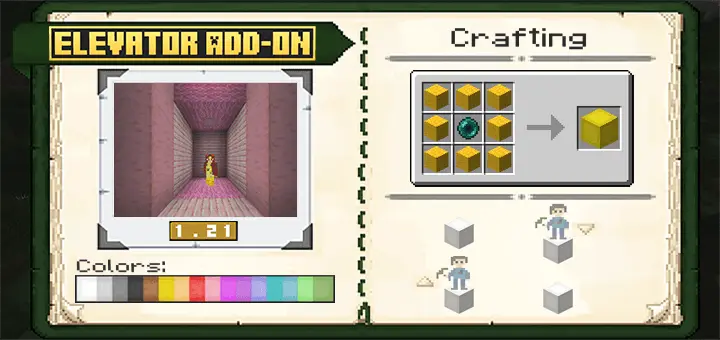
Elevator Addon for Minecraft Bedrock
Look, nobody likes building twenty flights of stairs or wasting time jumping up cobblestone towers. This Elevator Addon is straight-up essential if you want your base to feel pro. All you gotta do is place the elevator blocks vertically, stand on one, and just crouch to go down or jump to go up. That’s it. No commands, no laggy redstone contraptions, no extra nonsense.
It’s perfect for modern bases, bunkers, sky builds, secret hideouts—whatever. Works solo or on servers. You can move between floors smooth as butter, and it doesn’t mess with your builds. Clean, simple, and makes vertical travel actually fun.

Your storage room is downstairs, your bedroom is upstairs, and you forgot your pickaxe again. The Elevator addon gets you between floors in Minecraft Bedrock with a jump or a crouch.
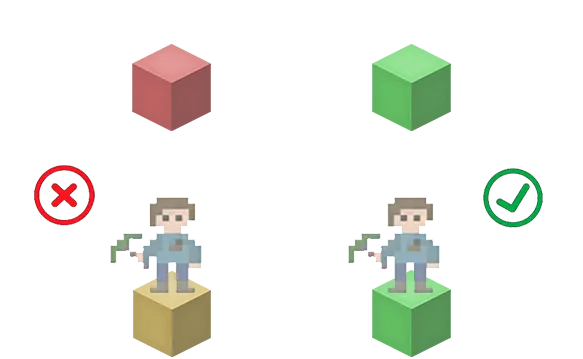
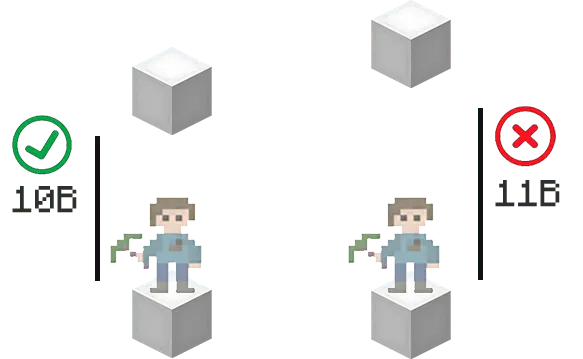
The setup revolves around elevator blocks placed vertically above one another. Stand on a block and jump to travel up; crouch to head down. There’s no moving elevator car to wait for—the blocks transport you between the two points. Keep the distance in mind when planning your build: connected elevators can be up to ten blocks apart. They also need to be the same color, so a red elevator won’t connect to a blue one. That makes the system easy to understand once you’ve placed your first pair. Try linking two nearby floors in your survival base, then get used to the controls as you go about your usual routine. Whether you’re fetching supplies or returning home after a mining trip, a quick trip between levels can make a busy base easier to navigate.
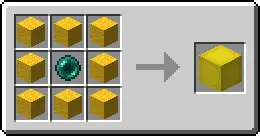
You can craft an elevator block using eight pieces of wool and an ender pearl at a crafting table. There are sixteen colors to choose from, with the wool determining the elevator’s color. That gives builders some flexibility when fitting the blocks into a room: choose a shade that suits the floor, or pick something that stands out so you can spot the elevator as soon as you walk in. Matching colors also give you a way to distinguish one set of elevators from another when planning a larger base. Remember to bring enough materials for both ends of your route, since you need two blocks to travel between levels. The ender pearl makes each elevator a small investment in survival, so it’s worth deciding which route you use most often before you start crafting.
A compact lift can be especially handy in a build where space is tight. Connect a workshop to the storage room beneath it, give your tower a shortcut between floors, or add a quick route between a bunker and the surface. You can leave the surrounding rooms however you like, from a polished modern interior to a rough mining outpost. And if you’re the kind of player who keeps adding new levels to a base, the ten-block limit gives you a useful measurement to keep in mind while planning each connection. The addon’s instructions say to enable experimental gameplay features when setting it up, so check your world settings before trying it. Once your matching blocks are in place, getting around becomes one less thing to fuss over. Step onto the elevator, jump or crouch, and get back to whatever you were building before you remembered that missing pickaxe.
Installation:
- Download Mod;
- Open the downloaded file to install;
- Select it in the settings;
- Have fun!
Comments (0)