Tools & Potions Reimagined! Resource Pack
- 3-10-2025, 09:28
- 1 528
Tools & Potions Reimagined! — a clean visual overhaul that makes your Minecraft Bedrock hotbar read at a glance. Inspired by Obscuria’s Tools and Brewery vibe, it refreshes every tool, sword, and potion so you don’t fumble mid-fight or mid-mine. The style stays faithful to vanilla, but edges, colors, and surface details are tuned so picks look like picks, axes look like cutters, and swords look fight-ready without turning into noisy textures. Potions get the same treatment: clearer bottles, more deliberate color cues, and labels you can mentally sort in half a second when a raid wave hits.
In survival, the payoff is immediate. You crack open the inventory and can actually see what matters: that iron pick for deepslate, the axe you keep for camp chores, and the sword you swap to when the bell rings. Down in caves, you can flick to the right tool by feel instead of pausing to squint at icons, and when you sprint out of a tunnel with zombies on your heels, the right splash or drinkable stands out instead of blending with the rest. For builders, screenshots and showcases benefit too—racks, item frames, and brewing corners look tidy and intentional, not like a pile of near-identical bottles.
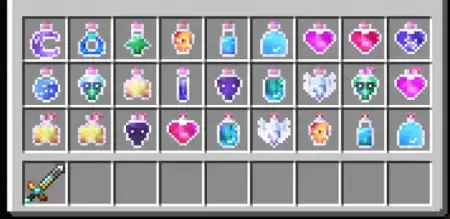
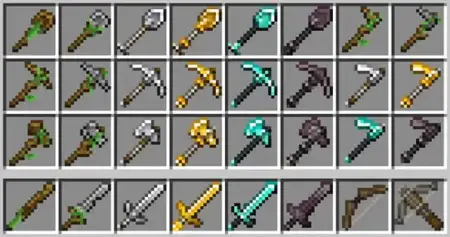
You finally upgraded to Netherite, and your new sword looks… a lot like the old one. Tools & Potions Reimagined gives your gear a fresh look, from the pickaxe you take underground to the bottles waiting beside your brewing stand.
The project redesigns Minecraft Bedrock’s tools, swords, and potions while sticking with a pixel style that fits the game. Pickaxes, axes, and other everyday gear get their own textures, so there’s something new to look at throughout a survival run, not just after you reach the Nether. If you spend half your time with a pickaxe in hand, you might as well enjoy the look of it.
Netherite has two visual options: one keeps colors closer to the usual Minecraft style, while the other adds gold and diamond accents. The trimmed version is a nice pick if you want your hard-earned equipment to look a little fancier. The default-colored version keeps things more understated. Neither changes how strong the gear is; you’re choosing the design you’d rather see in your hotbar and on your item frames.
Potions get their own makeover, too. The bottles have distinctive designs that give a brewing station more character and make a collection more interesting to look through. Set up a shelf for your favorite brews, fill a chest before a Nether trip, or put some bottles on display in an alchemist’s room. You’ll still want to check the potion name before drinking one, especially if you’re carrying several effects into a fight. A nice-looking bottle won’t help much if you grab the wrong one in a panic.
There’s an important detail on the linked download page: the file offered there is Potions Reimagined, so it changes the potion textures but doesn’t include the redesigned tools. The full project provides the potion pack separately from the two tool options. If you want both parts, download the potion file and one of the tool files. Pick either trimmed Netherite or default-colored Netherite for the tools, depending on which style you prefer.
Open each downloaded .mcpack with Minecraft to import it, then activate the packs you want under Resource Packs in your world settings. The project lists files for a range of Bedrock versions, including 1.21, so check that the download matches your game. Once everything is active, open your inventory and take a look at your usual loadout. It’s a small change, but it gives the gear you carry on every adventure a bit more personality.
The netherite pass is the flex: custom colorways trimmed with gold and diamond alongside the default set, so late-game kits can match your base theme or team colors without breaking the vanilla look. It’s all visual—no gameplay changes—so achievements and realm rules stay intact while your UI and storage walls get a serious clarity boost. If you want your loadout to be unmistakable in motion and your brewing station to actually communicate what’s ready at a glance, Tools & Potions Reimagined! makes everyday Minecraft Bedrock play sharper, cleaner, and way easier to manage.
Installation:
- Download Texture;
- Use Minecraft PE
- Open the downloaded .mcpack to install;
- Select texture in settings;
- Done.
In survival, the payoff is immediate. You crack open the inventory and can actually see what matters: that iron pick for deepslate, the axe you keep for camp chores, and the sword you swap to when the bell rings. Down in caves, you can flick to the right tool by feel instead of pausing to squint at icons, and when you sprint out of a tunnel with zombies on your heels, the right splash or drinkable stands out instead of blending with the rest. For builders, screenshots and showcases benefit too—racks, item frames, and brewing corners look tidy and intentional, not like a pile of near-identical bottles.
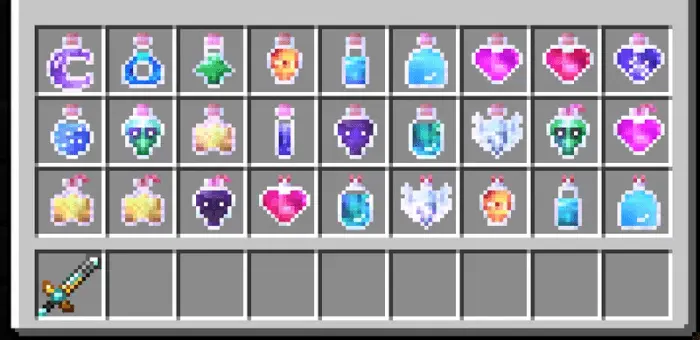
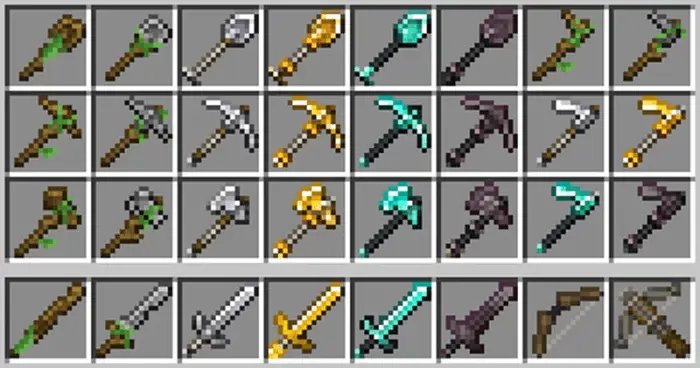
You finally upgraded to Netherite, and your new sword looks… a lot like the old one. Tools & Potions Reimagined gives your gear a fresh look, from the pickaxe you take underground to the bottles waiting beside your brewing stand.
The project redesigns Minecraft Bedrock’s tools, swords, and potions while sticking with a pixel style that fits the game. Pickaxes, axes, and other everyday gear get their own textures, so there’s something new to look at throughout a survival run, not just after you reach the Nether. If you spend half your time with a pickaxe in hand, you might as well enjoy the look of it.
Netherite has two visual options: one keeps colors closer to the usual Minecraft style, while the other adds gold and diamond accents. The trimmed version is a nice pick if you want your hard-earned equipment to look a little fancier. The default-colored version keeps things more understated. Neither changes how strong the gear is; you’re choosing the design you’d rather see in your hotbar and on your item frames.
Potions get their own makeover, too. The bottles have distinctive designs that give a brewing station more character and make a collection more interesting to look through. Set up a shelf for your favorite brews, fill a chest before a Nether trip, or put some bottles on display in an alchemist’s room. You’ll still want to check the potion name before drinking one, especially if you’re carrying several effects into a fight. A nice-looking bottle won’t help much if you grab the wrong one in a panic.
There’s an important detail on the linked download page: the file offered there is Potions Reimagined, so it changes the potion textures but doesn’t include the redesigned tools. The full project provides the potion pack separately from the two tool options. If you want both parts, download the potion file and one of the tool files. Pick either trimmed Netherite or default-colored Netherite for the tools, depending on which style you prefer.
Open each downloaded .mcpack with Minecraft to import it, then activate the packs you want under Resource Packs in your world settings. The project lists files for a range of Bedrock versions, including 1.21, so check that the download matches your game. Once everything is active, open your inventory and take a look at your usual loadout. It’s a small change, but it gives the gear you carry on every adventure a bit more personality.
The netherite pass is the flex: custom colorways trimmed with gold and diamond alongside the default set, so late-game kits can match your base theme or team colors without breaking the vanilla look. It’s all visual—no gameplay changes—so achievements and realm rules stay intact while your UI and storage walls get a serious clarity boost. If you want your loadout to be unmistakable in motion and your brewing station to actually communicate what’s ready at a glance, Tools & Potions Reimagined! makes everyday Minecraft Bedrock play sharper, cleaner, and way easier to manage.
Installation:
- Download Texture;
- Use Minecraft PE
- Open the downloaded .mcpack to install;
- Select texture in settings;
- Done.
Comments (1)