XRAY Outline Addon / Texture Pack
- 3-10-2025, 10:42
- 3 321
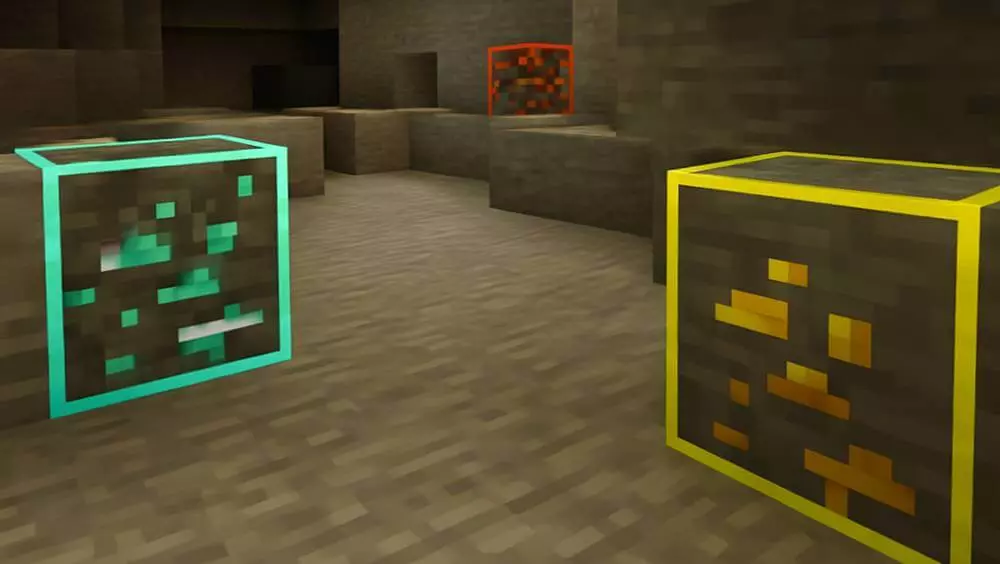
XRAY Outline Mod will allow you to see ores, but this is not a standard XRAY, but XRAY Outline. That diamond vein might be sitting right behind the wall you were about to walk past. XRAY Outline makes ores easier to spot through surrounding blocks, giving your next Minecraft Bedrock mining trip a very different feel.
Instead of digging long tunnels and hoping to hit something valuable, you can look for visible ore outlines and decide where you want to mine. Diamond, iron, gold, and redstone are among the ores highlighted by the pack. Their borders help them stand out against the surrounding terrain, making it easier to pick a target when you’re exploring underground. You still have to reach the blocks and mine them yourself, so bring the right pickaxe and leave space in your inventory for the haul. The outline view can take a little getting used to, especially in a large cave where there’s a lot to look at. Take a moment to get your bearings before heading toward the first cluster you see. A promising vein is great, but it’s less exciting if you rush toward it and tumble into a ravine on the way.
XRAY Outline can be useful when you have a specific project in mind. Need iron for rails, tools, or a stack of hoppers? Head underground and look for it instead of spending the whole session cutting branches into a tunnel. If redstone is what you’re after, you can focus your search on the ore you need for your next contraption. Builders might appreciate a quicker way to gather materials before settling in for a long construction session, while players who enjoy experimenting can use the pack to get a clearer look at the underground around a base. It’s also a handy way to pick a direction when a mining trip has gone quiet and your inventory is mostly full of cobblestone. Keep a few torches and building blocks with you, though. Knowing where an ore is doesn’t remove the hazards between you and it, and a route that looks straightforward can still lead past a dark cave or a dangerous drop.
To try the pack, open the downloaded file with Minecraft and activate it in your resource pack settings. Once it’s enabled, head somewhere familiar and spend a few minutes learning how the outlines look before taking on a bigger excavation. You can switch back to your usual textures when you want to explore without the extra visibility. XRAY Outline is a tool for players who want to spend less time searching and more time collecting the materials for their next idea. It changes the challenge of finding ore, so it’s particularly suited to a world where you’re happy to give yourself that advantage. If you play on a shared server, check whether its rules allow X-ray packs before using it there. Then grab your pickaxe, choose a project, and see what’s hiding beyond the walls of your mine. Just don’t forget which way leads back to your chests once your pockets are full.
Installation:
- Download Texture;
- Open the downloaded .mcpack to install;
- Select texture in settings;
- Done.
Comments (4)