Pixlli HD Bedrock – Texture Pack
- 2-07-2026, 04:36
- 571
Upgrade your blocky world without ruining that classic feel using the Pixlli HD texture pack. It injects crazy realistic PBR depth into the standard blocks, making your game look incredibly premium while keeping the true vanilla vibe.
I've tried a ton of hyper-realistic mods over the years, and honestly, most of them just look completely out of place. Plastering actual photos of real-life stone onto a square block just feels wrong when you are playing a sandbox game. This specific Bedrock resource pack totally avoids that trap. Instead of completely redesigning everything from scratch, it just takes the iconic pixel art you already know and gives it actual 3D depth. When you walk past a cobblestone wall or a brick house, the lighting actually catches the grooves and edges of the materials. It makes the whole environment feel super tactile and alive without feeling like a completely different game.
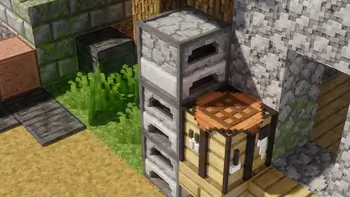
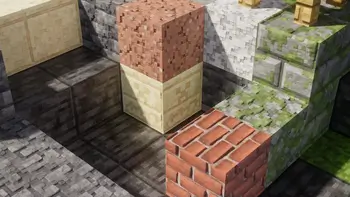
Default 16x textures turn into a blurry, muddy mess the second you build anything larger than a basic storage barn. Pixlli HD Bedrock rips that pixelated crunch out of your game, replacing it with an ultra-clean, hand-crafted aesthetic that treats your eyes to actual fidelity.
Most high-resolution texture packs fall straight into the trap of using photorealistic scans. They plaster photos of actual gravel and bark onto cubic meshes, which usually ends up looking uncanny and totally out of place in a sandbox built on geometric voxels. Pixlli takes the high road. It doubles down on stylized artistry, delivering a 128x upscaled presentation where every single block looks hand-painted by an actual concept illustrator. Wood grain features subtle knots and distinct planed planks, stone bricks carry delicate chiseled edges that suggest real craftsmanship, and dirt paths look soft rather than like compressed static noise. The visual upgrade is immediately obvious without stripping away the signature charm that makes Minecraft recognizable.
Where this pack truly shines is in architectural detailing. If you spend your multiplayer sessions working on mega-bases, cathedral roofs, or medieval trading hubs, low-res textures inevitably blur together into flat color walls when viewed from a distance. With these high-density surfaces loaded in, your structures maintain crisp silhouettes and readable depth across entire render distances. Glass panes become crystal-clear windows with subtle geometric frames instead of distracting streaks running through your line of sight. Foliage receives a massive visual buff as well, turning birch forests and cherry groves into lush, vibrant biomes that actually feel alive when the morning sun breaks through the canopy.

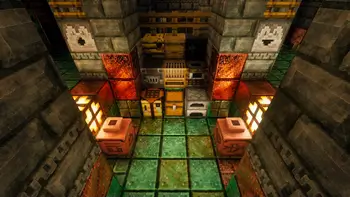
Because it relies on high-quality PBR mapping, the way your torches and natural sunlight interact with the terrain is just beautiful. You get that heavy, immersive atmosphere whether you are strip mining in a dark ravine or building a massive castle on your survival server. It is also surprisingly well optimized for Minecraft PE setups, meaning you get this massive visual upgrade without dealing with the insane lag that usually comes with heavy realism tweaks. If you want your realm to look modern but refuse to lose that nostalgic charm, you absolutely need this MCPE texture pack in your active loadout. Boot up your world and watch the vanilla blocks literally pop out at you.
Installation:
- Download Texture;
- Open the downloaded .mcpack to install;
- Select texture in settings;
- Done.
I've tried a ton of hyper-realistic mods over the years, and honestly, most of them just look completely out of place. Plastering actual photos of real-life stone onto a square block just feels wrong when you are playing a sandbox game. This specific Bedrock resource pack totally avoids that trap. Instead of completely redesigning everything from scratch, it just takes the iconic pixel art you already know and gives it actual 3D depth. When you walk past a cobblestone wall or a brick house, the lighting actually catches the grooves and edges of the materials. It makes the whole environment feel super tactile and alive without feeling like a completely different game.
Default 16x textures turn into a blurry, muddy mess the second you build anything larger than a basic storage barn. Pixlli HD Bedrock rips that pixelated crunch out of your game, replacing it with an ultra-clean, hand-crafted aesthetic that treats your eyes to actual fidelity.
Most high-resolution texture packs fall straight into the trap of using photorealistic scans. They plaster photos of actual gravel and bark onto cubic meshes, which usually ends up looking uncanny and totally out of place in a sandbox built on geometric voxels. Pixlli takes the high road. It doubles down on stylized artistry, delivering a 128x upscaled presentation where every single block looks hand-painted by an actual concept illustrator. Wood grain features subtle knots and distinct planed planks, stone bricks carry delicate chiseled edges that suggest real craftsmanship, and dirt paths look soft rather than like compressed static noise. The visual upgrade is immediately obvious without stripping away the signature charm that makes Minecraft recognizable.
Where this pack truly shines is in architectural detailing. If you spend your multiplayer sessions working on mega-bases, cathedral roofs, or medieval trading hubs, low-res textures inevitably blur together into flat color walls when viewed from a distance. With these high-density surfaces loaded in, your structures maintain crisp silhouettes and readable depth across entire render distances. Glass panes become crystal-clear windows with subtle geometric frames instead of distracting streaks running through your line of sight. Foliage receives a massive visual buff as well, turning birch forests and cherry groves into lush, vibrant biomes that actually feel alive when the morning sun breaks through the canopy.
Because it relies on high-quality PBR mapping, the way your torches and natural sunlight interact with the terrain is just beautiful. You get that heavy, immersive atmosphere whether you are strip mining in a dark ravine or building a massive castle on your survival server. It is also surprisingly well optimized for Minecraft PE setups, meaning you get this massive visual upgrade without dealing with the insane lag that usually comes with heavy realism tweaks. If you want your realm to look modern but refuse to lose that nostalgic charm, you absolutely need this MCPE texture pack in your active loadout. Boot up your world and watch the vanilla blocks literally pop out at you.
Installation:
- Download Texture;
- Open the downloaded .mcpack to install;
- Select texture in settings;
- Done.
Comments (0)