Dream Skin
- 21-11-2025, 10:18
- 1 274
Dream Skin is that kind of skin you put on once and just keep using because it feels right. It’s a clean green hoodie, white mask, comfy pants – nothing extra, nothing glowing all over the place – just a chill look that still stands out in a lobby or on a busy server. You still get that “Dream-style” feeling, but it’s clearly a fan version, so it doesn’t look like you just grabbed a rip of the original.
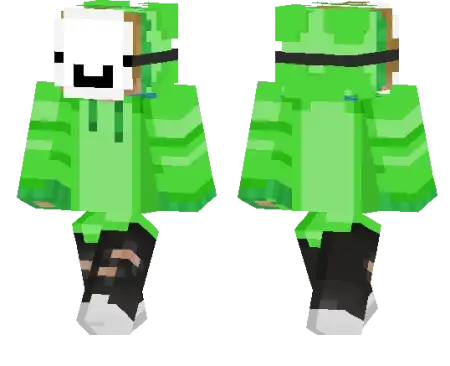
A green hoodie and a white mask can say plenty without a single word in chat. This Dream-inspired skin gives your Minecraft character a relaxed look that’s easy to recognize in a crowd.
The outfit pairs that bright hoodie with a white mask and casual pants, keeping the overall design simple enough to use as your everyday skin. It’s a fan-style take on a familiar look, with the green top doing most of the work when you’re viewed from a distance. Up close, the mask gives your character a bit more personality without covering the outfit in extra details. If you’ve been looking for something that feels comfortable in both a survival world and a minigame lobby, it’s a solid choice. Check it out in third person after equipping it: you’ll get a better look at how the hoodie and the rest of the outfit come together than you would while staring at your own hand in first person.
The skin can be a fun pick for a challenge with friends. Set up a fresh world, agree on a goal, and see who can reach it first, whether that means finding diamonds, building a shelter, or making it to the End. If your group enjoys manhunt-style games, the green outfit gives the runner a look that suits the occasion while the hunters try to keep up. You can make those rules as serious or ridiculous as you want. Give everyone a short head start, choose a finish line across the map, or simply see who survives the longest. The skin doesn’t add a challenge mode by itself, but it’s an easy way to dress for the kind of session you’re planning. It works just as well when the race is over and everyone’s back at the base sorting loot.
There’s no need to save the look for competitive play, either. Wear it while you expand a village, explore a cave system, or build a place to hang out with your friends. The green hoodie gives screenshots a splash of color, and the mask makes your character easy to spot when you line up for a group picture. To install the skin in Minecraft Bedrock, download the file and extract the PNG if it arrives inside a ZIP archive. Open your profile, edit your character, and choose the option to import a skin. Select the image, check the model preview, and pick the arm style that fits the texture. Once you’re happy with it, load into a world and take a look around. The change is cosmetic, so your movement and combat work as they did before. What you do in the outfit is up to you: a careful survival run, a chaotic chase, or a quiet afternoon adding one more room to your base.
It works great anywhere: speedrunning worlds, PvP arenas, skywars, bedwars, or long SMP seasons with friends. When you’re rushing a village, clutching a fall with a water bucket, or trying to escape a stacked player, this skin looks natural in screenshots and clips. Your teammates will recognize you by the green hoodie instantly, even from far away on bridges or in caves.
There’s no pay-to-win nonsense or special hitbox tricks here. Dream Skin doesn’t change gameplay at all – it just gives you a clean, iconic main skin that feels good to use every day. If you like simple skins with a bit of YouTube speedrunner energy, this one fits right in.
How to Install Skins in Minecraft Bedrock
- Download a .png skin (64×64 or 128×128).
- Open Minecraft Bedrock.
- Go to Profile (hanger icon) → Edit Character.
- Tap Owned → Import → Choose New Skin.
- Select your .png file.
- Pick a model: Classic (Steve) or Slim (Alex).
- Confirm to equip and play.

A green hoodie and a white mask can say plenty without a single word in chat. This Dream-inspired skin gives your Minecraft character a relaxed look that’s easy to recognize in a crowd.
The outfit pairs that bright hoodie with a white mask and casual pants, keeping the overall design simple enough to use as your everyday skin. It’s a fan-style take on a familiar look, with the green top doing most of the work when you’re viewed from a distance. Up close, the mask gives your character a bit more personality without covering the outfit in extra details. If you’ve been looking for something that feels comfortable in both a survival world and a minigame lobby, it’s a solid choice. Check it out in third person after equipping it: you’ll get a better look at how the hoodie and the rest of the outfit come together than you would while staring at your own hand in first person.
The skin can be a fun pick for a challenge with friends. Set up a fresh world, agree on a goal, and see who can reach it first, whether that means finding diamonds, building a shelter, or making it to the End. If your group enjoys manhunt-style games, the green outfit gives the runner a look that suits the occasion while the hunters try to keep up. You can make those rules as serious or ridiculous as you want. Give everyone a short head start, choose a finish line across the map, or simply see who survives the longest. The skin doesn’t add a challenge mode by itself, but it’s an easy way to dress for the kind of session you’re planning. It works just as well when the race is over and everyone’s back at the base sorting loot.
There’s no need to save the look for competitive play, either. Wear it while you expand a village, explore a cave system, or build a place to hang out with your friends. The green hoodie gives screenshots a splash of color, and the mask makes your character easy to spot when you line up for a group picture. To install the skin in Minecraft Bedrock, download the file and extract the PNG if it arrives inside a ZIP archive. Open your profile, edit your character, and choose the option to import a skin. Select the image, check the model preview, and pick the arm style that fits the texture. Once you’re happy with it, load into a world and take a look around. The change is cosmetic, so your movement and combat work as they did before. What you do in the outfit is up to you: a careful survival run, a chaotic chase, or a quiet afternoon adding one more room to your base.
It works great anywhere: speedrunning worlds, PvP arenas, skywars, bedwars, or long SMP seasons with friends. When you’re rushing a village, clutching a fall with a water bucket, or trying to escape a stacked player, this skin looks natural in screenshots and clips. Your teammates will recognize you by the green hoodie instantly, even from far away on bridges or in caves.
There’s no pay-to-win nonsense or special hitbox tricks here. Dream Skin doesn’t change gameplay at all – it just gives you a clean, iconic main skin that feels good to use every day. If you like simple skins with a bit of YouTube speedrunner energy, this one fits right in.
How to Install Skins in Minecraft Bedrock
- Download a .png skin (64×64 or 128×128).
- Open Minecraft Bedrock.
- Go to Profile (hanger icon) → Edit Character.
- Tap Owned → Import → Choose New Skin.
- Select your .png file.
- Pick a model: Classic (Steve) or Slim (Alex).
- Confirm to equip and play.
Comments (0)