ShapeMiner Mod / Addon
- 24-04-2026, 01:15
- 1 688

ShapeMiner Mod so you can use resource mining tools on a larger area: 3x3, 5x5, 7x7. There’s a moment in almost every Minecraft building project when I realize the space I cleared is too small. The storage room needs another wall of chests, the underground base needs a workshop, and suddenly I’m back to breaking stone one block at a time. ShapeMiner makes that part of the job much quicker. It adds hammers that can mine several blocks in a chosen pattern, letting you clear a small passage or a much larger area without making every swing individually.
The hammers offer 3×3, 5×5, and 7×7 area modes. A 3×3 opening is a comfortable size for a basic tunnel, while the larger patterns come in handy when you’re making room for a base or clearing out a big section underground. There are tunnel-mining options as well, including a mode for digging a long straight passage and a branch-mining pattern for searching for resources. Which one you use depends on the job: I’d pick a smaller area when working close to an existing room and save the widest setting for a place where I know I want plenty of space.
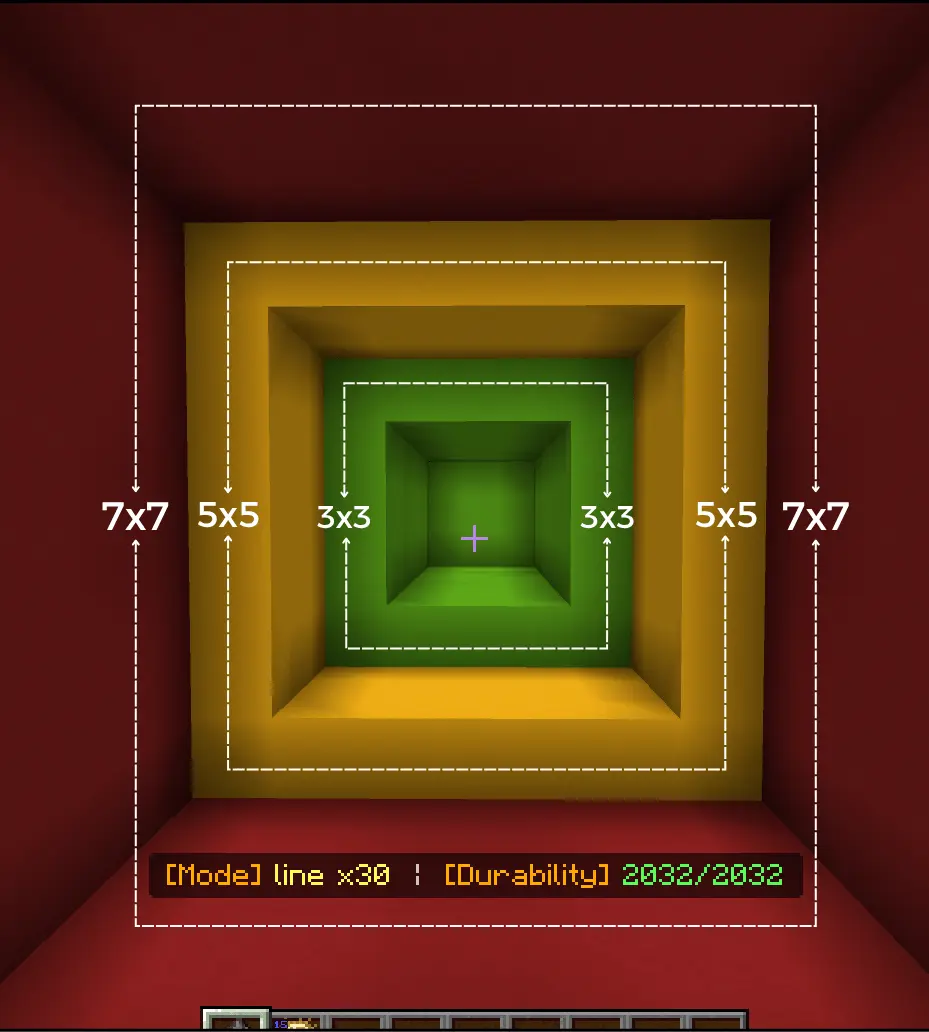
Switching modes is simple once you know the control. Crouch and use the hammer to cycle through its available patterns; on a computer, that means Shift and right-click. The current mode and remaining durability appear above the hotbar, so you can check the setting before you start digging. That’s worth doing every time you return to a finished part of your base. A 7×7 hammer is great when you’re clearing stone, but it’s less welcome if you were only trying to remove a block next to a wall you spent an hour decorating.
The hammers come in familiar material tiers, from stone through netherite. You won’t have access to every advanced pattern immediately: the more powerful modes are available with diamond-tier hammers and above. That gives you a reason to improve your equipment as your projects get bigger. The tools also support familiar enchantments such as Efficiency, Fortune, and Silk Touch. If you have a particular use in mind—gathering ore or collecting blocks for a build—consider which enchantment belongs on the hammer you plan to bring. Keep an eye on its durability while you work, especially during a long excavation.
ShapeMiner is useful whether you’re planning an underground hall, digging a route between bases, or simply looking for resources. It can save a lot of repetitive work, leaving you more time to decide what the cleared space should become. I’d still carry a regular pickaxe for careful work around chests and finished builds, then switch to the hammer when there’s a large stretch of stone in the way. Achievements remain enabled, so you can use the add-on as part of an ongoing survival adventure while you work toward whatever project comes next.
Installation:
- Download Mod;
- Open the downloaded file to install;
- Select it in the settings;
- Have fun!
Comments (0)