Rainbow Outline Selection Addon
- 7-07-2026, 08:35
- 1 021
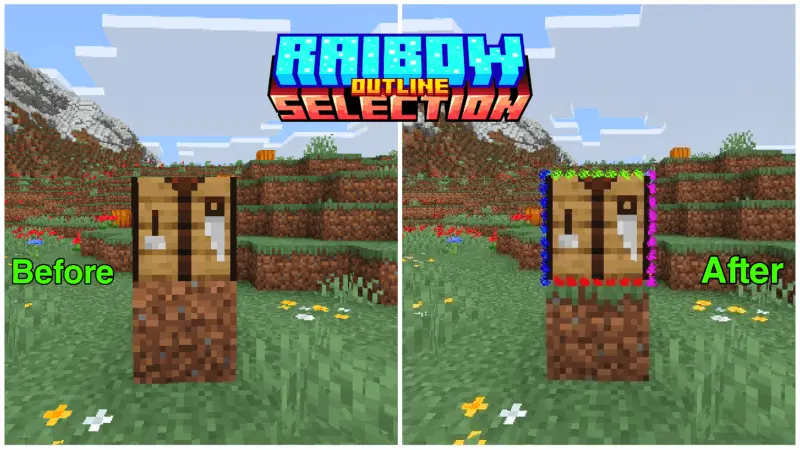
The Rainbow Outline Selection Addon ditches that boring vanilla block border and swaps it for a fully animated, 12-edge particle rainbow that cycles colors in real-time. It is the easiest way to give your Bedrock HUD a massive visual upgrade without tanking your frames.
Staring at the same solid black box every time you hover over a block gets stale after your first few hours in a new world. Most resource packs try to fix this by just changing the default line color to white or green, but this custom Minecraft Bedrock rainbow outline mod goes way further. The second your crosshair hits a target, the edges light up with a clean dotted border that rapidly shifts through the entire color spectrum—from red and lime all the way to cyan and magenta—refreshing every two ticks.
Have you ever wondered why Mojang still forces us to use a microscopic dark grey line to see what block our crosshair is actually targeting? Back in the bright green grass biomes of early survival, it barely registered as an issue. Drop down into an Ancient City or start digging through blackstone inside a Bastion Remnant, and your target indicator practically vanishes into the background textures. You end up breaking the wrong block during a speed-bridge over the Void or accidentally smacking a Sculk Shrieker because you couldn't tell where one dark pixel ended and the next began.
Replacing that dull static box with a glowing chroma border fixes your spatial awareness instantly. Because the outline cycles through vibrant neon hues, it creates stark contrast against every single block palette in the game. Whether you are staring at pitch-black obsidian, blinding white snowbanks, or murky underwater kelp forests, the exact hitbox under your cursor stands out like a gamer keyboard in a dark room.
Competitive players on PvP servers and Skywars lobbies swear by high-visibility overlays for a huge mechanical reason. When you are sprint-bridging across a gap while getting pelted with eggs and snowballs, knowing the exact microsecond your crosshair catches the edge of a block saves you from falling into the abyss. Redstone engineers working inside cramped three-by-three wiring shafts get massive mileage here too. Trying to aim past a sticky piston to click a repeater buried behind dark grey stone usually results in breaking your own circuit, whereas a bright RGB box shows you the exact target geometry before you swing or tap.
What makes this MCPE visual addon download so impressive is what is happening under the hood. A lot of older packs relied on janky invisible entities or heavy geometry hacks to get custom borders working, which absolutely destroyed your performance on mobile and console. This one is built entirely on the modern Script API. That means you get a buttery smooth, animated selection box up to seven blocks away without any lag spikes or weird rendering glitches ruining your playthrough.
Whether you are filming content and want your screen to pop, or just need something fresh to look at while strip mining, grab this custom block selection pack. It is lightweight, incredibly satisfying, and instantly modernizes your setup.
Installation Mod:
- Download the .mcaddon / .mcpack;
- Open the file to import into the game;
- In World Settings → Resource Packs and Behavior Packs, enable it (turn on Experiments if needed);
- Have fun!
Comments (0)