FurniPlus - Medieval Mod / Addon
- 9-04-2026, 00:46
- 699
FurniPlus - Medieval Minecraft mod will add a lot of realistic furniture in medieval style to your game. You’ve finished the stone walls, added a steep roof and hung lanterns by the entrance. From outside, your medieval house looks exactly the way you wanted. Then you step inside and find a bed, a crafting table and a lot of empty space. FurniPlus - Medieval helps with that last part, adding furniture and decorations that suit castles, village homes and other builds with an old-fashioned feel.
The collection includes wooden tables and chairs, shelves, cabinets and fireplaces. Their detailed models give you more to work with when you’re furnishing a room. A table can become the centre of a dining hall, while a cabinet against the wall makes an empty corner look like it belongs to the rest of the house. You can keep the arrangement simple or spend time moving things around until each room feels the way you imagined it.
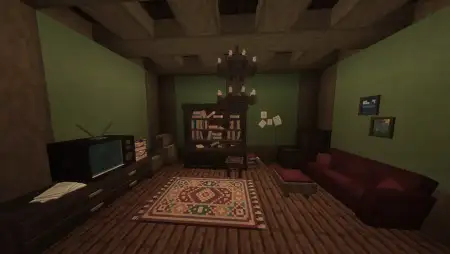
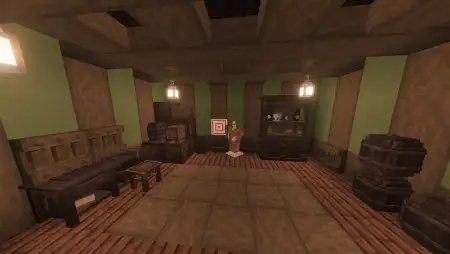
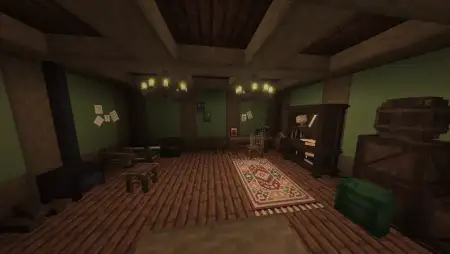
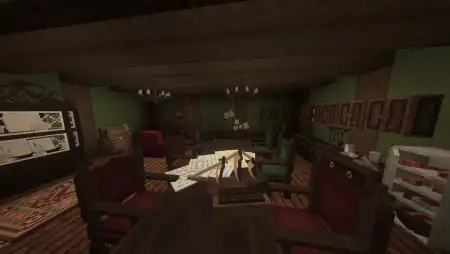
A small cottage is a good place to start. Put a table near the window, add a chair and choose a spot for a fireplace. Shelves and a cabinet can fill out the room without leaving it too crowded. If the house already has a bedroom upstairs, try using a few pieces downstairs to make it feel like somewhere your character might return to after a day of mining. You don’t need a huge building to make the furniture look at home.
The same pieces can work in a much larger castle. A long hall with a high ceiling has plenty of space for tables, while a fireplace can give one end of the room a clear focal point. Side rooms might become bedrooms, meeting rooms or quiet places to store and display things. When you’re building on that scale, it’s easy to finish the outside and leave the interior for later. Having furniture ready to place can make that last part of the project much more enjoyable.
A tavern is another fun idea, particularly if you have a village or a multiplayer world where friends visit. Arrange tables and chairs around the room, leave a space near the fireplace and give the building a few shelves or cabinets along the walls. It could sit beside a road leading into town or near the gates of your castle. Once the room is furnished, even a fairly simple building can look like a place where travellers might stop before continuing their journey.
The furniture also pairs naturally with materials you may already use in medieval builds. Wooden floors, stone walls and lanterns give the pieces a setting that feels consistent, while different kinds of wood can help each house have its own character. Try a darker interior for a grand hall and a lighter one for a modest village cottage. You can always rearrange the furniture as the rest of the building takes shape.
FurniPlus - Medieval is still being developed, and crafting information has not yet been provided for the furniture. It’s a lovely collection to explore while planning a build or decorating in creative mode. Whether you’re furnishing one little room or working through an entire castle, the tables, shelves and fireplaces give you a starting point for making each space feel lived in.
Installation Mod:
- Download the .mcaddon / .mcpack;
- Open the file to import into the game;
- In World Settings → Resource Packs and Behavior Packs, enable it (turn on Experiments if needed);
- Have fun!
The collection includes wooden tables and chairs, shelves, cabinets and fireplaces. Their detailed models give you more to work with when you’re furnishing a room. A table can become the centre of a dining hall, while a cabinet against the wall makes an empty corner look like it belongs to the rest of the house. You can keep the arrangement simple or spend time moving things around until each room feels the way you imagined it.


A small cottage is a good place to start. Put a table near the window, add a chair and choose a spot for a fireplace. Shelves and a cabinet can fill out the room without leaving it too crowded. If the house already has a bedroom upstairs, try using a few pieces downstairs to make it feel like somewhere your character might return to after a day of mining. You don’t need a huge building to make the furniture look at home.
The same pieces can work in a much larger castle. A long hall with a high ceiling has plenty of space for tables, while a fireplace can give one end of the room a clear focal point. Side rooms might become bedrooms, meeting rooms or quiet places to store and display things. When you’re building on that scale, it’s easy to finish the outside and leave the interior for later. Having furniture ready to place can make that last part of the project much more enjoyable.
A tavern is another fun idea, particularly if you have a village or a multiplayer world where friends visit. Arrange tables and chairs around the room, leave a space near the fireplace and give the building a few shelves or cabinets along the walls. It could sit beside a road leading into town or near the gates of your castle. Once the room is furnished, even a fairly simple building can look like a place where travellers might stop before continuing their journey.
The furniture also pairs naturally with materials you may already use in medieval builds. Wooden floors, stone walls and lanterns give the pieces a setting that feels consistent, while different kinds of wood can help each house have its own character. Try a darker interior for a grand hall and a lighter one for a modest village cottage. You can always rearrange the furniture as the rest of the building takes shape.
FurniPlus - Medieval is still being developed, and crafting information has not yet been provided for the furniture. It’s a lovely collection to explore while planning a build or decorating in creative mode. Whether you’re furnishing one little room or working through an entire castle, the tables, shelves and fireplaces give you a starting point for making each space feel lived in.
Installation Mod:
- Download the .mcaddon / .mcpack;
- Open the file to import into the game;
- In World Settings → Resource Packs and Behavior Packs, enable it (turn on Experiments if needed);
- Have fun!
Comments (0)