TIME STOP Mod / Addon
- 8-04-2026, 01:14
- 2 588
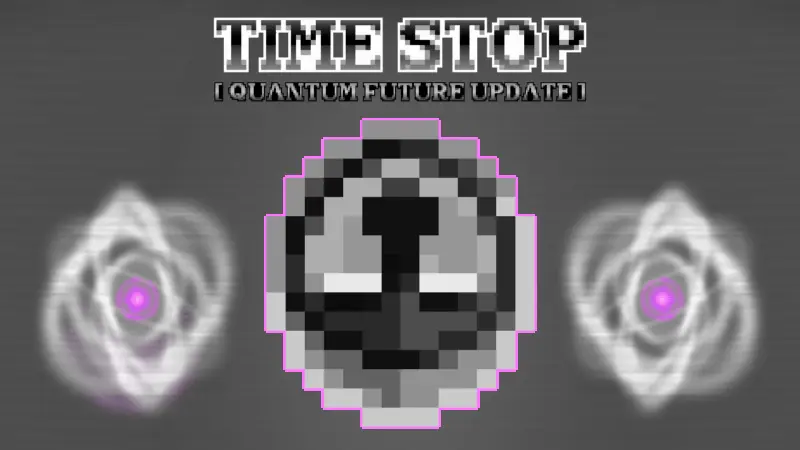
TIME STOP Mod drops a single tool with huge impact: a clock you craft, carry, and click when you want the world to hold still for a beat. The idea is simple—you set the tempo instead of letting the day-night cycle or a messy fight dictate it. Hit the clock to pause time, line up what needs doing, then release and let the world breathe again. It feels like having a metronome for your session: you decide when to push, when to reset, and when to take a clean snapshot of your work without rushing.
In survival, the clock turns chaos into choices. Cave dead-end and a crowd behind you? Stop the clock, place a quick wall, eat, and plan a smarter route. During a village raid, you can freeze the moment, mark targets, and reposition before the horn section gets loud again. Builders get the most zen use case: pause at sunrise, lay a tricky roof line while the light stays perfect, step back for screenshots, and resume when you’re satisfied. Redstone tinkerers can halt the tick, peek at a contraption’s state, and unpause to watch one slice of the cycle at a time—it’s a cleaner way to spot where your timing feels off.
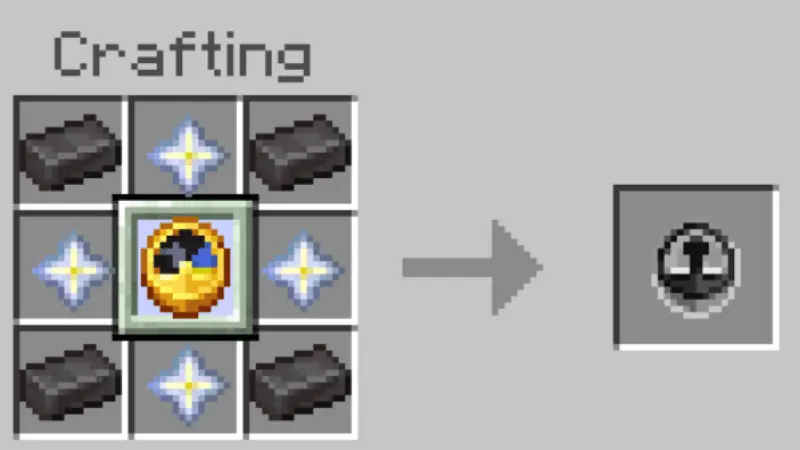
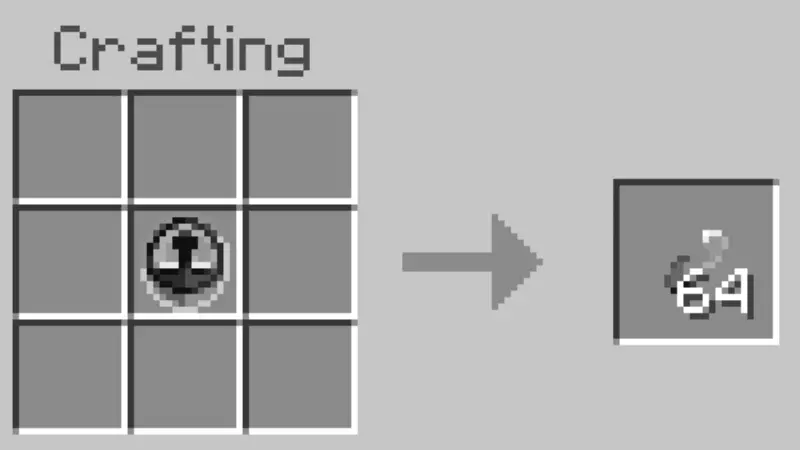
I’d keep the Time Stop item on my hotbar for those moments when a cave fight gets out of hand. One click, and the mobs around you stop moving while you figure out where to go. TIME STOP gives you that ability in Minecraft: you can pause the action, move around, and then let everything continue. It’s useful in a fight, but I’d be just as tempted to use it for a ridiculous screenshot of an arrow hanging inches from my face.
The item can be crafted and carried with the rest of your gear. When you use it, mobs can freeze, projectiles can stop in midair, and moving water can come to a halt. The daylight cycle can stop too. You remain able to move, which gives you time to look at the situation from somewhere other than the spot where you first panicked. Say you’ve wandered into a cave with several enemies and don’t like your chances. Pause the action, look for an opening, and move toward it before starting time again. Or stay put and decide which mob you want to deal with first. Either way, remember that the pause doesn’t remove the enemies. Once things start moving again, you’ll still have a fight—or an escape—ahead of you.
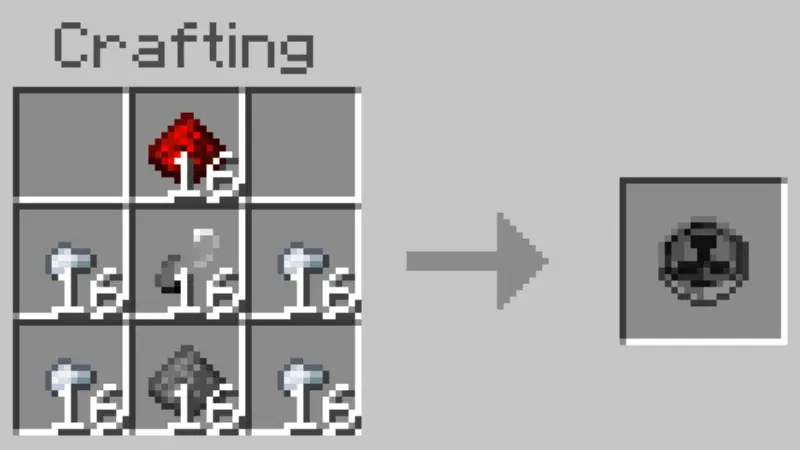
There’s another item to try once you’ve made the Time Stop item. You can extract Temporal Fragments from it and use them to craft a Quantum Bomb. It works more like a grenade, freezing entities and dropped items in a small area. That gives you a more localized option to experiment with when a group is gathered in one place. The regular time-stop ability can be fun outside combat, too. Catch a sunrise while you’re working on a build, walk around a scene before taking a screenshot, or watch what happens when you pause near moving water. It’s worth trying the item in a safe spot first, simply to get a feel for what it affects and what happens when you let time continue.
If you share a world, tell your friends what you’re about to do—or don’t, if they enjoy being surprised. Players holding a Time Stop item are protected from the effect, while players without one can be frozen. That opens up some funny possibilities for a cooperative adventure, as well as a few opportunities to get in each other’s way. You could give everyone an item before heading out, or agree that only one person gets to control the pause during a challenge. The download page provides separate behavior and resource packs; import both and enable them in the world settings. After that, make the item and keep it somewhere easy to reach. You may not need it every minute, but the next time you hear several mobs coming from the tunnel ahead, having a moment to stop and think could be very welcome.
Co-op, treat TIME STOP Mod like shared gear. Call out when you’re about to use it so nobody gets caught mid-jump, and agree on a “no spam” etiquette to keep the session flowing. I like to keep the clock on a dedicated hotbar slot so my thumb knows exactly where the brake pedal lives; it turns panic into habit. Whether you’re stabilizing a boss prep, saving a near-loss, or just fixing a build line without the sun racing you, the TIME STOP Mod gives you that rare luxury in this game: control over the moment you’re in.
Installation Mod:
- Download the .mcaddon / .mcpack;
- Open the file to import into the game;
- In World Settings → Resource Packs and Behavior Packs, enable it (turn on Experiments if needed);
- Have fun!
Comments (0)