Enchantment level limiter Mod / Addon
- 4-01-2026, 06:25
- 1 514

The Enchantment Level Limiter mod is a straight-up lifesaver if you run a Minecraft Bedrock server and hate when players abuse overpowered gear. We’ve all been there — you set rules like “no Sharpness V� or “Protection higher than III,� but someone always sneaks in an item with busted enchants. With this addon, that problem’s gone.
I tested it on my own Realm, and it worked perfectly. A player joined with a Sharpness V sword even though the cap was set to Sharpness IV. The second they pulled it out, the enchant got nerfed down automatically. No arguments, no admin chasing them around, just clean enforcement. Same thing happened with armor — Protection V instantly dropped to the allowed level.
The best part? It’s all automatic. You don’t have to babysit or dig through inventories, the mod does the dirty work for you. It keeps PvP fair, survival balanced, and your server drama-free. If you’re tired of players bending the rules, the Enchantment Level Limiter mod keeps everyone honest.

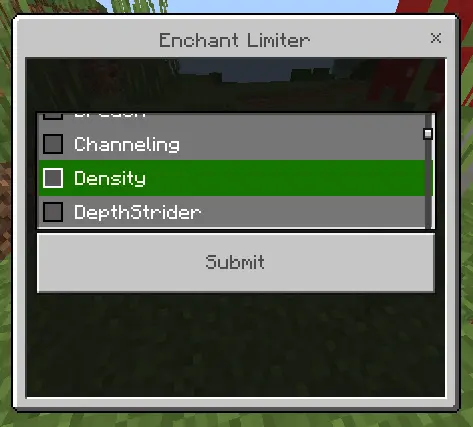
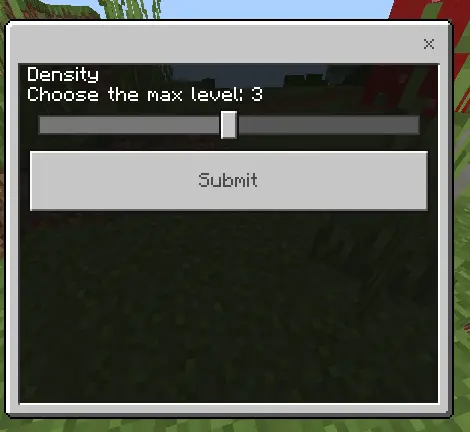
Running a private Realm always starts off chill until one guy shows up on week two rocking full Protection V armor and a sword that one-shots everything in render distance. The Enchantment Level Limiter mod completely kills that power creep by automatically enforcing your specific server rules the exact second a busted item gets equipped.
Admining a multiplayer world usually means spending half your time playing detective and digging through your friends' chests just to make sure they are not abusing glitches or dragging in illegal gear. Trying to maintain a balanced PvP economy when half the server is running standard iron setups and the other half is absolutely juiced on maxed out Netherite is an absolute nightmare. Setting a gentleman's agreement never actually works because someone always pushes the boundary. This specific Minecraft Bedrock addon takes all that tedious moderation work right out of your hands. You just configure the maximum permitted tiers for specific enchants, and the system handles the rest flawlessly in the background without needing any manual checks.
If you decide that Sharpness III is the absolute ceiling for your current wipe, that rule becomes hardcoded reality. It does not matter if a player somehow merges books on an anvil or tries to smuggle in illegal gear from a creative menu glitch. The very millisecond they transfer that overpowered sword into their active hotbar or slap on that heavy chestplate, the mod detects the violation and instantly downgrades the enchantment to match your legal server limit. There is no messy console spam, no awkward arguments in voice chat, and no need to hand out heavy bans. It simply acts as an invisible bouncer that keeps everyone playing on the exact same balanced playing field.
This tool is especially clutch if you are trying to host custom factions or dedicated combat arenas where TTK (time to kill) actually matters. When players know they can not just out-grind their opponents with absurd magical stats, they are forced to actually rely on proper movement, spacing, and consumable timing during fights. The entire survival loop feels much healthier because players stop treating the endgame like an infinite XP grind and start focusing on actual base building and territory control. Plus, it runs incredibly smoothly alongside most major behavior packs without tanking your server ticks.
Throwing this onto your Realm requires zero technical knowledge. You just drop the file into your active behavior pack slot and adjust the parameters to fit whatever vibe your community is going for this season. Whether you want to completely ban Mending to force a hardcore tool economy or just keep the damage numbers from getting too ridiculous, this utility provides total control. If you are exhausted from constantly policing your own friends and just want to actually play the game, installing this automated limit is the smartest admin move you can make.
Installation:
- Download Mod;
- Open the downloaded file to install;
- Select it in the settings;
- Have fun!
Comments (0)