Health Change Displayer Mod / Addon
- 22-08-2025, 18:51
- 732
The Health Change Displayer Mod is one of those small addons for Minecraft Bedrock that makes a huge difference in combat. Normally, when you hit a mob or get hit yourself, you don’t really know how much health was lost unless you’re counting hits in your head. With this mod, every single change in health shows up right above the entity in real time.
I tried it out in a survival world, and it’s insanely useful. When I smacked a zombie, a number popped up showing exactly how much damage I dealt. When a skeleton tagged me with an arrow, I saw my own health loss right away. It’s clean, clear, and it keeps you way more aware of what’s happening during fights.
It works for both mobs and players, which makes it great for PvP too. You always know if your attacks are landing hard enough or if your opponent is hanging on with just a sliver of health.
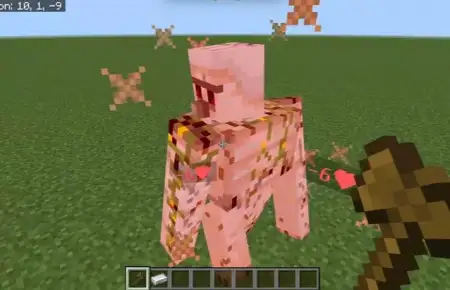
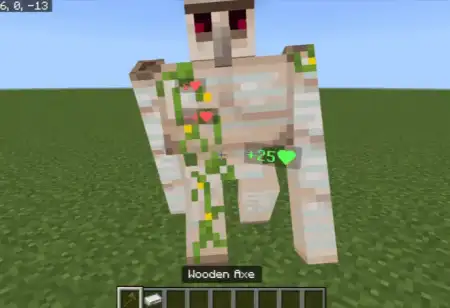
You land a hit on a skeleton, and a red number pops up before it can fire back. Health Change Displayer adds RPG-style feedback to Minecraft Bedrock, showing how much health an entity loses or regains.
The colors make the display easy to read in the middle of a fight: damage appears in red, while healing shows up in green. When a mob or player’s health changes, a number appears near the entity, giving you a look at the size of that individual change. Hit a zombie with a sword and you can see the result of the strike; watch an entity recover health and the green display shows the healing instead. It’s especially satisfying when several hits land in quick succession and the numbers start appearing around the fight. Keep in mind that the addon displays health changes rather than promising a permanent health bar. A damage number tells you what happened on that hit, but it doesn’t necessarily tell you exactly how much health your opponent has left.
There’s a use for those numbers beyond making combat feel more like an RPG. If you’re curious about your equipment, try comparing attacks under similar conditions and watch how the results differ. Take a sword and an axe into a test area, use each against the same type of mob, and see what appears. You can also experiment with enchanted gear or different ways of attacking, remembering that the target and circumstances can affect the damage it takes. In survival, that feedback makes encounters easier to follow: a red number confirms that your strike landed, while a green one lets you notice healing when it happens. During a crowded fight, the display can help you see which enemy was affected by an attack, though you’ll still need to watch your surroundings. Numbers on the screen won’t warn you that another creeper has wandered up behind you.
The addon can also add a little extra drama to friendly PvP matches. Trade a few hits with a friend, compare the results, and see how your equipment performs before setting up a larger arena event. For adventure maps or worlds with custom combat content, the feedback gives players another way to understand what’s happening as they fight, although the addon’s description doesn’t promise compatibility with every custom mechanic. Installation is straightforward: open the downloaded .mcaddon file with Minecraft, activate the imported packs in your world settings, and enter the game. No additional setup or experimental features are required according to the addon’s description. Once it’s active, look for the red and green numbers during your next encounter. Whether you’re testing a new weapon or simply enjoying a survival world, every hit and heal has a little more feedback.
Installation:
- Download Mod;
- Open the downloaded file to install;
- Select it in the settings;
- Have fun!
I tried it out in a survival world, and it’s insanely useful. When I smacked a zombie, a number popped up showing exactly how much damage I dealt. When a skeleton tagged me with an arrow, I saw my own health loss right away. It’s clean, clear, and it keeps you way more aware of what’s happening during fights.
It works for both mobs and players, which makes it great for PvP too. You always know if your attacks are landing hard enough or if your opponent is hanging on with just a sliver of health.
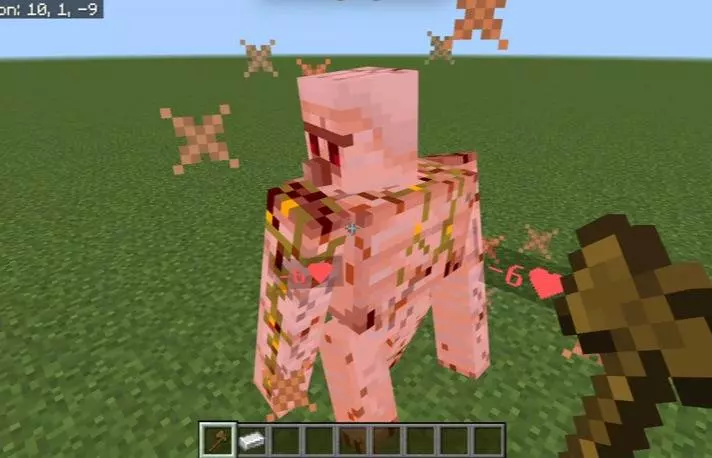
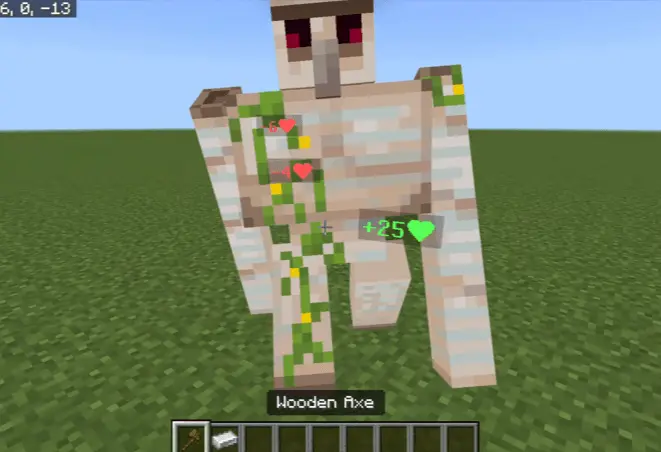
You land a hit on a skeleton, and a red number pops up before it can fire back. Health Change Displayer adds RPG-style feedback to Minecraft Bedrock, showing how much health an entity loses or regains.
The colors make the display easy to read in the middle of a fight: damage appears in red, while healing shows up in green. When a mob or player’s health changes, a number appears near the entity, giving you a look at the size of that individual change. Hit a zombie with a sword and you can see the result of the strike; watch an entity recover health and the green display shows the healing instead. It’s especially satisfying when several hits land in quick succession and the numbers start appearing around the fight. Keep in mind that the addon displays health changes rather than promising a permanent health bar. A damage number tells you what happened on that hit, but it doesn’t necessarily tell you exactly how much health your opponent has left.
There’s a use for those numbers beyond making combat feel more like an RPG. If you’re curious about your equipment, try comparing attacks under similar conditions and watch how the results differ. Take a sword and an axe into a test area, use each against the same type of mob, and see what appears. You can also experiment with enchanted gear or different ways of attacking, remembering that the target and circumstances can affect the damage it takes. In survival, that feedback makes encounters easier to follow: a red number confirms that your strike landed, while a green one lets you notice healing when it happens. During a crowded fight, the display can help you see which enemy was affected by an attack, though you’ll still need to watch your surroundings. Numbers on the screen won’t warn you that another creeper has wandered up behind you.
The addon can also add a little extra drama to friendly PvP matches. Trade a few hits with a friend, compare the results, and see how your equipment performs before setting up a larger arena event. For adventure maps or worlds with custom combat content, the feedback gives players another way to understand what’s happening as they fight, although the addon’s description doesn’t promise compatibility with every custom mechanic. Installation is straightforward: open the downloaded .mcaddon file with Minecraft, activate the imported packs in your world settings, and enter the game. No additional setup or experimental features are required according to the addon’s description. Once it’s active, look for the red and green numbers during your next encounter. Whether you’re testing a new weapon or simply enjoying a survival world, every hit and heal has a little more feedback.
Installation:
- Download Mod;
- Open the downloaded file to install;
- Select it in the settings;
- Have fun!
Comments (0)