Helicopters Mod / Addon
- 15-08-2025, 09:07
- 1 570

The Helicopters mod makes traveling in Minecraft Bedrock way more exciting. Instead of slogging through swamps, climbing mountains, or boating across oceans, you just hop into your own chopper and lift off.
Flying it feels smooth and natural — no complicated controls, just point where you want to go and enjoy the ride. You can jump between biomes in minutes, spot villages and rare structures from the air, and land exactly where you need to be. I used mine to check out a jungle temple I saw from far off, and it saved me hours of walking.
It’s perfect for survival worlds too. You can haul loot back from raids, scout for base locations, or just get a bird’s-eye view of your builds. Once you’ve flown around in one of these, going back to running everywhere feels painfully slow.
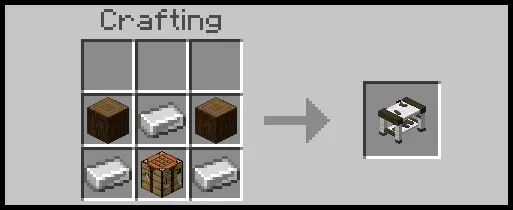
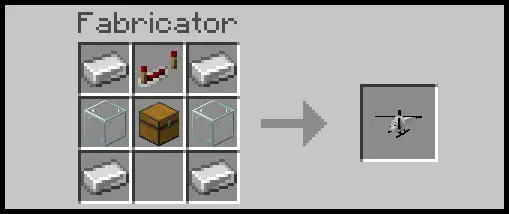
That mountain range doesn’t look quite so intimidating when you can fly over it. Helicopters adds a new way to travel through Minecraft Bedrock, putting you in the pilot’s seat for trips above forests, oceans, and the builds you’ve left far below.
Take off from an open area and give yourself a little time to get comfortable with the aircraft before heading across the map. The addon’s description says you steer by pointing where you want to go, which makes a short practice flight a good way to learn how it handles. Try taking off, turning over a familiar landmark, and coming back in for a landing near your starting point. Once you have a feel for it, the helicopter can make an ordinary exploration trip look completely different. A forest that takes ages to cross on foot becomes a view from above, and a coastline is much easier to follow when you can see where it bends. Keep an eye out for a clear place to land before you descend, especially if the area below is covered in trees or steep terrain.
The aerial view is useful when you’re deciding where to go next. Fly over the edge of a jungle, follow a river, or look for an open patch of land where you might want to start a new base. If you spot a village or an interesting structure, you can choose a landing spot and investigate on foot. It’s also a handy way to check on a build that has grown beyond what you can comfortably see from the ground. A quick flight over your settlement can help you judge how the roads connect, whether a roof looks symmetrical, or where another tower might fit. You might even spot a half-finished project you forgot about behind the hill—every long-running Minecraft world seems to have at least one of those.
In survival, a helicopter gives you another option for traveling between the places you’ve already discovered. Fly out to explore, bring the useful things you collect in your inventory, and return home without tracing every river and mountain pass on foot. You could build a landing pad beside your main base and add another near a distant outpost so you have recognizable places to aim for. In a shared world, friends can set up landmarks and see who can navigate between them most accurately. To install the addon, import its separate resource and behavior files into Minecraft and activate the packs in your world settings. Then find an open spot and get ready for your first flight. The available description doesn’t specify a crafting recipe or fuel system, so check the in-game items and instructions for the aircraft before planning a long trip. Once you’re airborne, even familiar terrain can be worth seeing again from a new angle.
Installation:
- Download Mod;
- Open the downloaded file to install;
- Select it in the settings;
- Have fun!
Comments (0)