Ore Finder Mod / Addon
- 29-04-2025, 13:40
- 1 499

Ore Finder is a special mod so you can find the ore and diamonds you need in Minecraft. A tunnel full of cobblestone isn’t much of a reward for a long mining session. Ore Finder helps you check what’s buried in an area before you commit your pickaxe to the job.
The addon gives you an Ore Finder item that scans a selected section of your Minecraft Bedrock world and counts the blocks inside it. Choose two opposite points to mark the area, and the results show which block types are present and how many of each were found. That includes valuable ores, so you can check for diamonds or iron without relying entirely on luck. The scan is useful information, though it doesn’t simply hand over the loot: you’ll still need to explore the selected area and mine what you find. If the results show diamonds somewhere in a large patch of deepslate, you know the search is worth continuing, but you’ll have to work out where those blocks are hiding. Try checking smaller sections when you want to narrow things down and avoid turning the whole cave into a maze of tunnels.
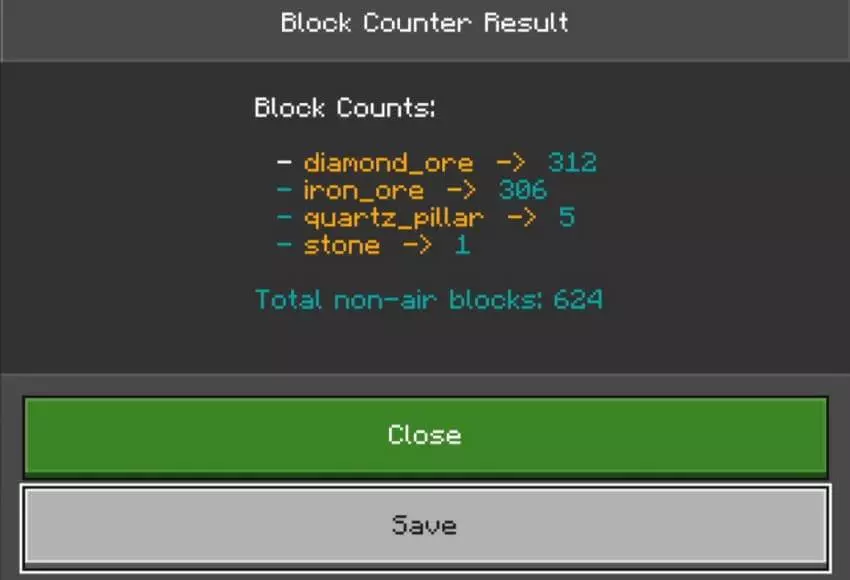
The block counter has uses beyond hunting for diamonds. Because the results also include ordinary blocks, builders can get a clearer idea of what’s inside an area they’re planning to excavate. Want to carve out a massive underground storage room? Scan the space first and see what you’ll be digging through. You might discover resources worth collecting along the way, or simply get a sense of how much solid material stands between you and your finished build. It’s a useful way to approach a big project when you’d rather have some information before swinging your pickaxe for the next hour. The results give you a count for each block type, along with a total for the non-air blocks in the selected space. That makes the tool handy for comparing areas as well as looking for a specific resource.
You can save scan results under a name and return to them later, which comes in handy when you’re checking several spots around a base or planning a longer mining operation. Give each area a name you’ll recognize, then revisit the saved counts when you’re ready to decide where to dig. Found a promising section but need to head home for fresh tools? Keep the results and come back prepared. If an area doesn’t contain what you’re after, move on and check somewhere else rather than spending the whole trip guessing. Ore Finder doesn’t remove the dangers of mining, so bring food, light, and a way to deal with whatever’s waiting in the dark. What it does offer is a more informed way to explore: mark an area, see what’s inside, and decide whether it’s worth digging into.
Installation:
- Download Mod;
- Open the downloaded file to install;
- Select it in the settings;
- Have fun!
Comments (0)