Enchantment Descriptions Addon
- 10-11-2025, 03:31
- 1 563
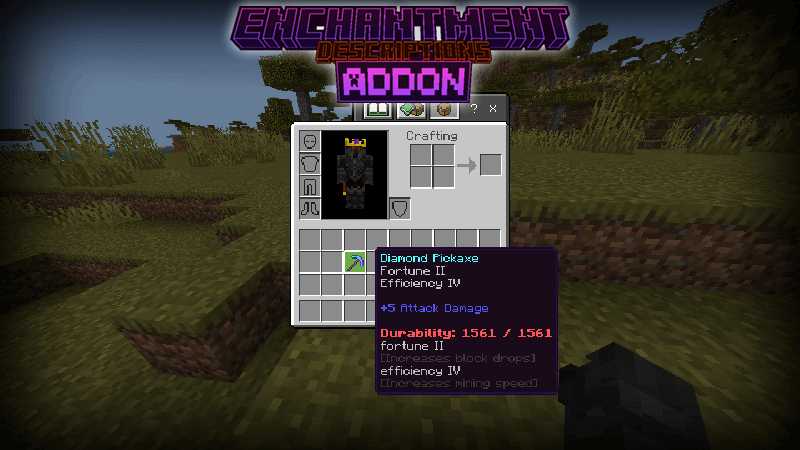
Enchantment Descriptions Addon description of enchantment effects in Bedrock. VERY useful function. Found an enchanted item and have no clue what its upgrade does? Enchantment Descriptions puts the explanation right in your Minecraft Bedrock inventory.
The add-on automatically adds descriptions and levels to enchanted items, giving you a clearer idea of what each enchantment is supposed to do. Instead of staring at a name and a Roman numeral while trying to remember an old guide, you can check the item in your inventory and read the information there. That comes in handy when you’ve brought home a haul from a structure and want to sort through your new gear. A piece of armor might be worth keeping for a particular adventure, while a tool could be better suited to a job back at base. The description gives you a starting point for making that call. It’s especially helpful if you’re learning the enchanting system and would rather spend your time playing than repeatedly stopping to look up unfamiliar names. Even experienced players can run into an enchantment they rarely use and appreciate a quick reminder before deciding where an item belongs.
Think about the choices you make before a mining trip. Efficiency helps a tool mine faster, while Unbreaking gives an item a chance to avoid losing durability when used. Knowing the difference makes it easier to decide which pickaxe you want to take underground and which one you’d rather save for later. Mending is another useful enchantment to recognize: it can use collected experience to repair equipped gear. The same idea applies to weapons and armor: read the effects on your equipment, compare them with what you already have, and pick the pieces that make sense for the task ahead. Enchantment levels are shown too, so you can see more than just the name when comparing items. It won’t make the decision for you, but having the information nearby makes the process less of a guessing game. You can spend those levels and resources with a better understanding of what you’re putting on your gear.
There’s also a benefit when you return home with a cluttered inventory. Before throwing enchanted gear into a chest, check what it does and sort the pieces you might want to use. A shared storage room becomes easier to manage when everyone can inspect an item and understand its enchantments without asking the player who found it. You might keep one chest for equipment you’re ready to use and another for items you want to compare later. That way, your next trip starts with a quick look through your supplies instead of a search through every chest at home. The descriptions are there to explain your equipment; the add-on’s listing doesn’t promise new enchantments or special combat abilities. To get started, open the downloaded add-on file with Minecraft and activate it in your world settings. Then inspect an enchanted item and see the information for yourself. Whether you’re preparing for a cave run or choosing armor, the answer is closer to hand.
Installation:
- Download Mod;
- Open the downloaded file to install;
- Select it in the settings;
- Have fun!
Comments (0)