Levitation Defence Mod / Addon
- 5-11-2025, 06:28
- 807
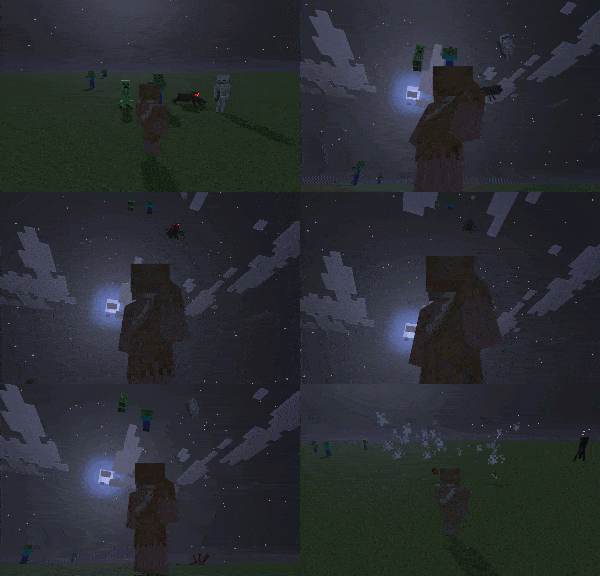
Levitation Defence Mod makes your crouch key a “nope” button. The second you sneak, anything nasty inside roughly a 12-block bubble lifts off like they stepped on a launch pad, hangs for a beat, and then slams back down hard. Skeleton rush in a tight hallway? Crouch—arrows stop, bones go airborne, problem solved. Cave spider pileup in a mineshaft? Crouch—they’re confetti. Raids around the village gate feel way calmer when the front wave just… ascends.
Use it like a pulse, not a lifestyle. Tap-sneak to clear a room, stand up to stop pulling new targets, and move. In survival runs, this is clutch in trial chambers, ancient city corridors, and fortress bridges where pushing mobs away buys breathing space. Out on the surface, path your roads with two-wide slabs so drops land cleanly after the fall; inside bases, add trapdoors or carpets to keep loot from bouncing into hoppers you didn’t mean to feed.
Couple smart cautions: in the End, flying mobs off the island means goodbye to drops—fight over solid platforms, not void edges. In the Nether, avoid popping the field over lava lakes unless you’re cool with watching loot sizzle; bridge with railings or place catch blocks. Co-op, call your crouch before you hit it so friends don’t chase floating targets off ledges, and let the ranged player farm freebies while you keep the bubble up.
Surrounded by mobs? Make them take the stairs to the sky. Levitation Defence turns sneaking into a way to send nearby hostile mobs floating, giving you a fresh way to handle a crowded fight in Minecraft Bedrock.
The idea is straightforward: crouch when danger gets close, and hostile mobs within roughly twelve blocks are lifted into the air before falling back down. That makes the sneak control useful for more than edging along cliffs or hiding your name in multiplayer. Picture a group of zombies closing in while you’re trying to get through a cave entrance. Instead of backing into a wall and swinging wildly, you can trigger the effect and use the opening to reposition. The fall can hurt affected mobs, although the outcome will depend on the space around you and where they land. A low ceiling, for example, makes for a very different encounter than an open field. Pay attention to your surroundings, then decide whether you want to fight, retreat, or collect yourself before moving on. Even a moment of breathing room can feel huge when your health is getting low.
The addon becomes especially entertaining when several enemies show up at once. A mineshaft can go from a messy spider encounter to a scene full of airborne mobs, while a village raid gives you plenty of reasons to keep an eye on the sky. Try tapping sneak when the group gets close, then stand up and move while you assess what’s left. You can still bring a sword, bow, food, and armor along for the trip; levitation gives you another option during a fight, and it doesn’t mean you should ignore whatever lands nearby. Skeletons are a good reminder to stay alert: an elevated enemy can still be trouble, so keep cover in mind instead of assuming every arrow will stop. If you enjoy experimenting, set up an open test area and see how the effect changes encounters compared with fighting in a narrow tunnel.
Where you use the ability matters as much as when. Over solid ground, it’s easier to keep track of enemies and collect any drops after the fight. Near lava or the edge of an island in the End, you risk losing useful loot if mobs end up somewhere you can’t reach. A wide platform gives you more room to maneuver and makes the aftermath easier to sort out. When playing with friends, give them a heads-up before crouching in the middle of a fight; floating targets can make everyone rethink their next move. To get started, open the downloaded addon file with Minecraft and activate the imported pack in your world settings. Then head somewhere with a little room and try the sneak control when hostile mobs approach. Levitation Defence adds a playful twist to survival combat, especially for players who like turning a chaotic ambush into an even stranger spectacle.
It’s hilariously strong crowd control that still rewards good habits: quick pulses, safe arenas, and clean loot lanes. Once you map a route with “crouch points,” you’ll wonder how you ever handled swarms without it.
Installation Mod:
- Download the .mcaddon / .mcpack;
- Open the file to import into the game;
- In World Settings → Resource Packs and Behavior Packs, enable it (turn on Experiments if needed);
- Have fun!
Comments (0)