Props And Furnitures 1980s Furnitures Expansion Mod / Addon
- 21-10-2025, 14:00
- 1 155
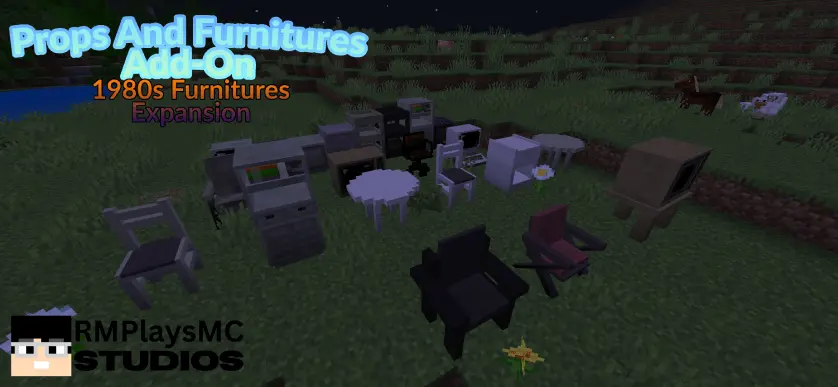
Props And Furnitures 1980s Furnitures Expansion Mod — think woodgrain cabinets, boxy televisions, chunky seating, and that warm, lived-in look you remember from old family photos. Drop a set in your living room and the space instantly time-travels: a low TV stand anchors the wall, cabinet blocks frame the corners, and a couple of sturdy chairs pull the room together for screenshots or RP nights. It’s décor first and foremost—purely cosmetic pieces that make interiors feel complete without touching hitboxes or combat—so you get the look without changing how the game plays.
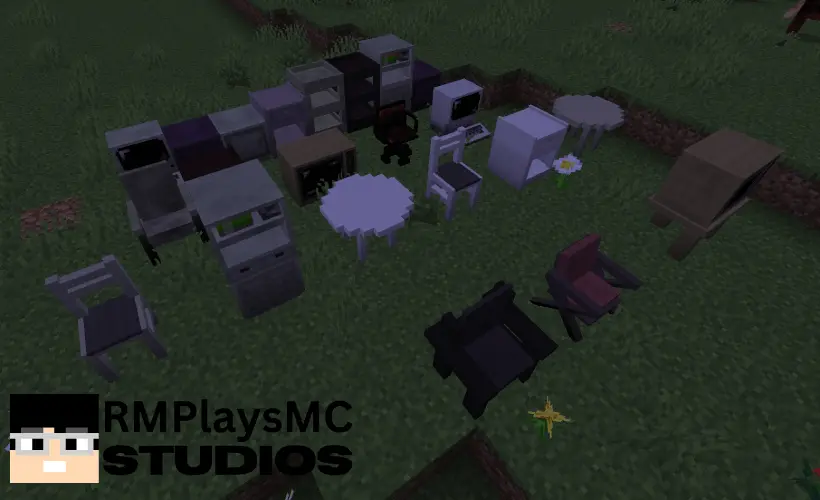
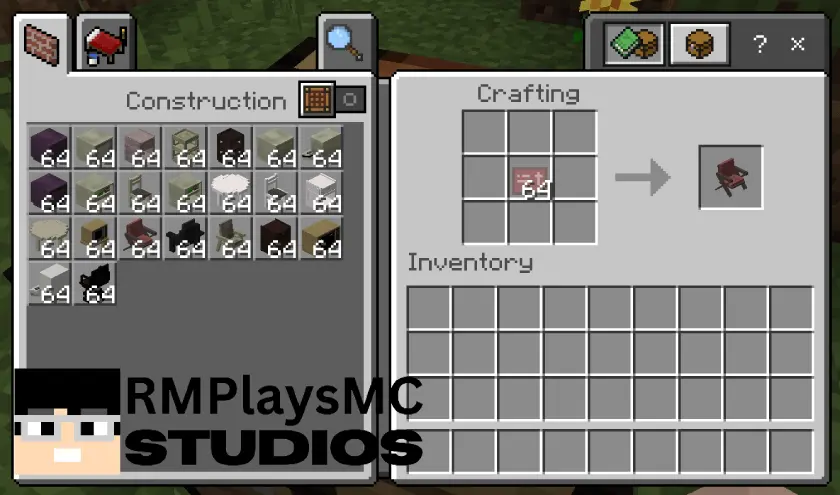
Survival play is straightforward. Crafting stays friendly: walk up to a standard crafting table and use paper with red dye to unlock the expansion’s furniture recipes (no special stations, no power systems). From there, kit rooms fast. A small kitchen gets a breakfast nook with matching seats; a studio apartment build reads instantly with a TV, cabinet stack, and a pair of chairs by the window; a basement hangout snaps into place with a TV corner and spare seating for co-op nights. Because everything is block-based, you can slide pieces around until traffic flow feels right—clear path from door to sofa, enough space to move between chairs, and a clean line for your favorite angles.
If achievements matter to you, treat the pack as cosmetic and assume achievements are unknown—spin up a quick copy world to test before committing a long save. Otherwise, it’s plug-and-decorate: craft the parts, stage the room, and let the ’80s speak for itself. For builders who want cozy, retro interiors without a grind, Props And Furnitures 1980s Furnitures Expansion Mod nails the tone and keeps your session moving.
Give your Minecraft living room a trip back to the 1980s. This furniture expansion brings boxy TVs, chunky seating, and woodgrain cabinets into your builds.
Props And Furnitures 1980s Furnitures Expansion adds more than 20 retro furniture pieces for Minecraft Bedrock. The look is all about rooms that feel familiar and lived in: a television with a proper bulky silhouette, sturdy chairs gathered nearby, and cabinets that bring warmth to an otherwise bare wall. Start with a TV as the centerpiece of a living room, then arrange seating around it to create a spot that looks ready for a movie night. A cabinet in the corner can balance the room without making every wall feel crowded. These pieces also give you a reason to rethink the shape of a house. Instead of filling a huge open interior with whatever fits, try building smaller rooms with a clear purpose. A snug lounge, a narrow hallway, and a kitchen tucked off to one side can give the furniture a setting that suits its old-school style.
The fun is in making each room tell its own little story. Put a TV and a couple of chairs in a basement hangout, and suddenly your survival base has a place that feels separate from the storage room and crafting area. In a city build, use the furniture to outfit an apartment above a shop or give a suburban house a family-room vibe. A single chair beside a cabinet can make an empty corner look intentional, while a group of seats facing the television gives friends an obvious gathering spot for roleplay or screenshots. Leave enough space between pieces to walk through the room comfortably; a convincing interior should still be easy to navigate when you’re rushing back inside at night. You can lean into the decade with your own choice of wall colors and flooring, or mix the retro pieces into a newer build for a home that looks like it has been furnished over time. Either approach gives the furniture room to stand out.
There’s one important setup detail: this is an expansion, so it requires the base Props and Furnitures Addon. The expansion is distributed with separate resource and behavior packs, which you can import and enable in your world alongside the required base pack. Its furniture is intended for survival play as well as creative building, although the available descriptions don’t provide a complete, clear recipe list. Check the in-game crafting information before planning your materials. Once everything is in place, pick a room and experiment with the layout: move the chairs closer to the TV, shift a cabinet to another wall, or leave an open patch of floor so the space doesn’t feel cramped. This is a décor-focused add-on for players who enjoy the finishing touches as much as the building itself. Whether you’re furnishing one cozy house or decorating an entire neighborhood, the retro pieces give your interiors a recognizable personality without demanding that every room look exactly alike.
Installation Mod:
- Download the .mcaddon / .mcpack;
- Open the file to import into the game;
- In World Settings → Resource Packs and Behavior Packs, enable it (turn on Experiments if needed);
- Have fun!
Comments (1)