Frozen Christmas Hunt Map
- 30-12-2025, 14:52
- 1 243
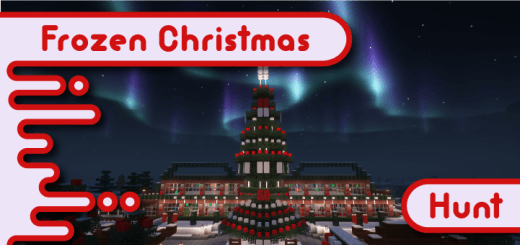
Frozen Christmas Hunt Map game where you will have to collect items on a frozen Christmas map. Bundle up and keep your eyes open: Frozen Christmas Hunt takes the holiday search into a wintry Minecraft setting. The real challenge is spotting what you came for before your friends do.
This Minecraft Bedrock minigame is a chance to slow down and pay attention to the places you might normally race past. A Christmas hunt makes every corner worth a second look, whether you’re playing alone at your own pace or turning the search into a friendly competition. Either approach has its appeal. The careful searcher gets the satisfaction of checking every detail; the impatient one might stumble across something interesting while everyone else is still discussing the plan. If your group likes to compete, agree on the rules before starting. Decide whether you’ll share clues, keep discoveries to yourselves, or work together until somebody gets stuck. A little friendly trash talk is optional, but it tends to show up on its own.
A winter holiday setting is a great backdrop for a search because it gives the whole session a different mood from an ordinary survival run. Instead of worrying about stocking a furnace or finding enough iron for armor, you can focus on the area in front of you and enjoy exploring it with friends. Look at the edges of paths, check places from more than one angle, and revisit an area if you think you rushed through it. Minecraft can hide plenty in plain sight, especially when you’re convinced you’ve already checked somewhere. If you find yourself circling the same spot, step back and take a fresh look rather than staring harder at the same wall. Playing with someone else helps too: the friend who missed the obvious route might be the one who notices a detail you walked past three times. That’s usually when they start reminding you about it for the rest of the game.
Frozen Christmas Hunt is an easy pick for a seasonal game night or a change of pace between larger Minecraft projects. You can make the session competitive, play as a team, or simply take your time exploring the holiday setting. To get started, import the downloaded map into Minecraft Bedrock and open it from your world list. Read any instructions provided in the world before beginning, since they’ll explain the goal and how the hunt is meant to be played. Then bring a friend, pick a direction, and see who has the sharper eyes. If the search takes longer than expected, that’s half the entertainment—especially when the answer turns out to be somewhere your entire group swore they had already checked. Once you’re done, you can always trade places, compare your routes, or challenge another friend to find what you missed.
How to install?
Android: you need to find the downloaded file on your phone, use any file manager for this and import the map into the game by opening it.
IOS: after receiving the map, the device itself will offer to install it.
Windows 10: go to the folder where the files are downloaded, find mcworld there and activate it.
Comments (0)