Birch Underground House Map
- 23-07-2026, 12:14
- 268
Adventure Maps / Creation Maps / Survival Maps
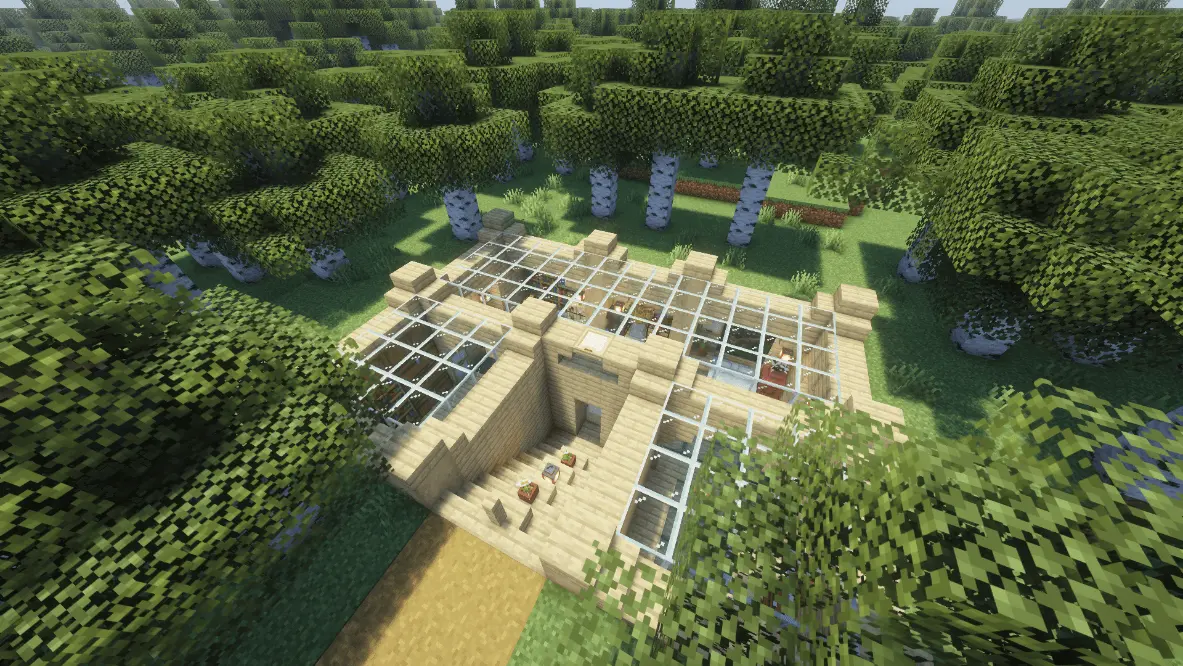
The Birch Underground House map drops you into a fully equipped, hidden survival bunker topped with massive glass skylights right beneath a vanilla birch forest. If you want a stealthy, move-in-ready base that looks incredible without cluttering up your world's surface, this is the perfect drop zone.
Most underground bases end up feeling like claustrophobic dirt caves, but this Minecraft Bedrock survival map flips that completely. Instead of walling you in, the creator carved out a gorgeous subterranean layout featuring massive glass ceilings. This lets all that natural daylight flood directly into your main rooms while keeping you completely shielded from nighttime mob spawns. You walk down a sleek, hidden staircase and instantly step into a modern, cozy bunker that naturally blends into the surrounding birch biome.


It’s not just about aesthetics, either. This MCPE custom map comes completely pre-loaded with everything you need to kickstart a serious survival run. You get an organized storage setup, all your essential crafting stations, and a secure bedroom, meaning you can skip the annoying early-game grind and get straight to mining. Because it uses pure vanilla geometry without any heavy background scripts, it runs at peak performance with absolutely zero chunk lag on any device.
Whether you're hosting a multiplayer server and want to keep your stash hidden from your friends, or you just need a chill solo start, download this Minecraft underground house map. Head down the stairs, organize your gear, and claim your new subterranean hideout.
How to install?
Android: you need to find the downloaded file on your phone, use any file manager for this and import the map into the game by opening it.
IOS: after receiving the map, the device itself will offer to install it.
Windows 10: go to the folder where the files are downloaded, find mcworld there and activate it.
Comments (0)